By Ctrl Editorial Team · May 12, 2026 · 9 min read
Stop Letting Slack Be Your Task Manager
A practical system for turning Slack requests, decisions, and follow-ups into clear tasks without living in threads all day.
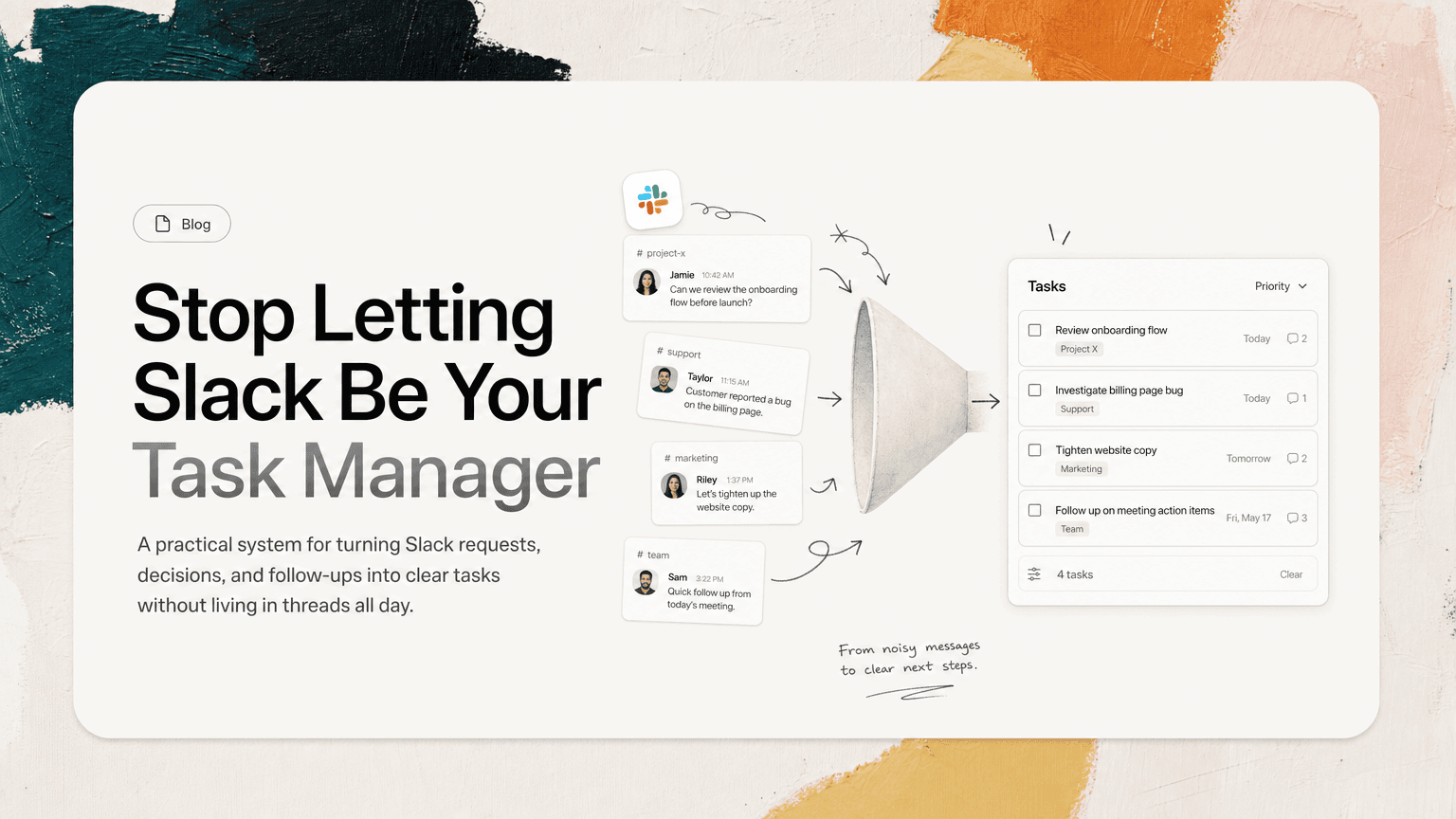
Slack is where a lot of work starts. It is rarely where work should live.
A teammate asks for a review in a thread. A customer issue gets mentioned in a channel. Someone drops a “quick follow-up” after a meeting. A decision is made three replies deep under a message from yesterday. By the end of the day, you have starred a few things, reacted with eyes on others, sent yourself a DM, and still feel like you are missing something.
The problem is not that Slack is bad. Slack is doing its job: fast communication. The problem starts when fast communication becomes your task system.
A real task needs more than a message. It needs an owner, an outcome, a priority, a due date or timing cue, and the context required to finish it. Most Slack messages do not arrive in that shape. Your job is to convert them before they disappear into the stream.
Why Slack messages make weak tasks
Slack is optimized for conversation, not commitment.
A message can look important without being actionable:
“Can we tighten up the onboarding copy before launch?”
That could mean several different things:
- Review the onboarding copy
- Rewrite specific sections
- Ask design to update screens
- Confirm launch timing
- Create a ticket for the website team
Until someone converts the message into a clear next action, it is just a vague request.
Slack also makes it easy to confuse visibility with progress. Reacting with an emoji, replying “will do,” or saving a message can feel like enough in the moment. But none of those actions answer the questions that matter later:
- What exactly needs to happen?
- Who owns it?
- When does it matter?
- Where is the context?
- Is this still relevant after the latest decision?
The goal is not to turn every Slack message into a task. The goal is to reliably capture the few that actually require action.
The three types of Slack messages worth converting
Not every message deserves a spot on your task list. Most do not. A useful system starts by knowing what to capture.
1. Direct requests
These are the easiest to spot because someone is asking you to do something.
Examples:
- “Can you review the proposal before I send it?”
- “Please update the launch checklist with the new QA step.”
- “Could you send the customer the revised timeline?”
Direct requests should become tasks unless they can be completed immediately in under a minute.
A good task version is specific:
Review Jamie’s enterprise proposal and leave comments before it is sent to Acme.
That is better than:
Review proposal.
The extra context prevents future you from reopening Slack and searching for what “proposal” meant.
2. Implied follow-ups
These are more dangerous because no one phrases them as tasks.
Examples:
- “We should probably check whether this affects billing.”
- “Let’s make sure support has the updated messaging.”
- “Worth confirming with legal before Friday.”
Nobody said, “Please create a task.” But work has been created. If the next action is not captured, the team will assume someone has it covered.
A good conversion looks like:
Confirm with legal whether the billing change affects current contract language before Friday.
The task names the action, the decision area, and the timing.
3. Decisions that create downstream work
Slack threads often contain decisions that quietly create work elsewhere.
Example:
“Let’s go with option B for the pricing page and ship it with the shorter FAQ.”
That decision may create several tasks:
- Update pricing page copy to match option B
- Remove long FAQ items from the launch doc
- Tell design the pricing page direction is final
- Add final review to the launch checklist
If you only remember the decision, execution still breaks. Decisions need to stay attached to the next actions they create.
A simple workflow for turning Slack into tasks
You do not need a complicated productivity method. You need a repeatable conversion habit.
Use this four-step workflow.
Step 1: Triage messages at set times
Do not process every Slack message the moment it arrives. That turns your day into a sequence of interruptions.
Instead, pick a few triage windows:
- Start of day: scan overnight and early messages
- Before or after lunch: catch active project threads
- Late afternoon: convert loose ends before signing off
During triage, you are not trying to answer everything. You are looking for work that needs to be captured.
Use a simple rule: if a message requires action after the current Slack session, it should not remain only in Slack.
Step 2: Rewrite the message as a next action
A message is not a task until it starts with a verb and describes an outcome.
Weak task:
Onboarding email
Better task:
Draft revised onboarding email for trial users and share with Maya for review.
Use verbs like:
- Review
- Draft
- Send
- Confirm
- Update
- Schedule
- Decide
- Follow up
- Escalate
If you cannot write the task clearly, that is a sign you need to ask a clarifying question in Slack before capturing it.
For example:
“When you say update the onboarding flow, do you mean the email sequence, the in-app checklist, or both?”
Clarifying before capture prevents vague tasks from polluting your list.
Step 3: Attach the source context
One reason Slack tasks fail is that they get separated from the conversation that explains them.
A task like “Update onboarding copy” is not enough if the actual requirements are buried in a thread with product, design, and support input.
When you capture a task, keep a link back to the source message or thread. Add any key details that will matter later:
- The channel where the request happened
- The person who asked
- The relevant deadline
- The decision that triggered the task
- The file, doc, email, or meeting note mentioned in the thread
This matters because task execution often happens hours or days after capture. Without context, you waste time reconstructing the request.
A strong task might look like this:
Update onboarding checklist copy to reflect the new three-step setup flow. Source: Slack thread in #launch with Nina’s final copy notes and Ari’s design constraint.
Now the task is executable.
Step 4: Decide priority before adding it to the list
A task list without priority is just another inbox.
Before adding a Slack task, decide what it means for your day or week:
- Does this need to happen today?
- Is it blocking someone else?
- Is it tied to a customer, launch, incident, or deadline?
- Is it less important than the work already on my plate?
Not every captured task deserves immediate attention. Some should go into a backlog. Some should be delegated. Some should be declined.
A useful priority label can be plain language:
- Today
- This week
- Waiting
- Later
- Blocked
Avoid creating ten priority levels. The point is to make the next decision easier, not to build a scoring model.
How to handle common Slack task traps
Even with a solid workflow, Slack creates recurring edge cases.
The “quick ask” that is not quick
Someone writes:
“Quick ask — can you sanity check this launch plan?”
The word “quick” does not make it quick. Before accepting it, define the task:
Review launch plan for major risks only and reply with top three concerns by 3pm.
Scope protects your calendar.
The thread with multiple owners
A long thread may produce five tasks across three people. Do not capture the whole thread as one item.
Break it apart:
- Priya: confirm support coverage for launch day
- Lee: update status page copy
- You: send final rollout note to customer-facing teams
This avoids the classic failure mode where everyone remembers the discussion and no one owns the follow-through.
The repeated request
The same task may appear in Slack, Gmail, and a meeting note. If you capture all three, your list becomes noisy.
Before creating a new task, check whether the work already exists. If it does, attach the new context to the existing task instead of duplicating it.
For example, a customer follow-up might start in Gmail, get discussed in Slack, and then come up again in a sales meeting. That should usually be one task with richer context, not three competing reminders.
The task hidden inside a decision
Watch for phrases like:
- “Let’s go with…”
- “We agreed to…”
- “Final call is…”
- “Can we align around…”
These often create downstream execution. After a decision, ask: “What now has to change because of this?”
That question turns decisions into work you can actually track.
A lightweight daily Slack-to-task routine
Here is a routine you can run in 15 minutes at the end of the day.
- Open your most active project channels.
- Scan threads where you were mentioned or replied.
- Look at saved messages or items you reacted to with eyes.
- Convert real requests into action-based tasks.
- Link back to the source thread.
- Merge duplicates with tasks from Gmail, meetings, or docs.
- Mark each task as Today, This week, Waiting, or Later.
- Pick the top three tasks for tomorrow.
The last step matters. Capturing is not the same as prioritizing. If you end the day with 25 newly captured tasks and no decision about what matters, you have only moved the mess from Slack into another tool.
When automation helps
Manual capture works, but it has limits. You will miss things when channels are busy, when requests are phrased indirectly, or when the same action appears across Slack, Gmail, and meetings.
This is where an assistant like CTRL can help: it connects to the tools where work already happens, identifies action items from messages, email, meetings, and notes, and turns scattered communication into clearer next actions with useful context attached.
The important point is not automation for its own sake. The point is reducing the amount of time you spend hunting through threads, remembering what was decided, and retyping half-formed requests into a task list.
The standard for a real task
Before you trust any Slack message as a task, run it through this checklist:
- Is there a clear action?
- Is there an owner?
- Is the desired outcome obvious?
- Is the timing clear enough?
- Is the source context attached?
- Is it prioritized against other work?
- Has it been checked against duplicates?
If the answer is no, it is not a real task yet. It is a message with potential.
Slack is excellent for surfacing work. But execution needs a cleaner system. Convert requests into specific next actions, keep the thread context attached, deduplicate repeated work, and decide priority before the task hits your list.
That is how you stop using Slack as a memory test — and start turning messages into work that actually gets done.


Make today life changing
Move from conversation to actions in seconds
Download the ^ctrl desktop app