By Ctrl Editorial Team · May 12, 2026 · 9 min read
Your Todo List Is Not Where Most Work Starts
Most missed tasks start as messages, emails, and meeting decisions. Here’s how to capture the work before it disappears.
Most todo lists are honest. They show the work you remembered to write down.
That is also the problem.
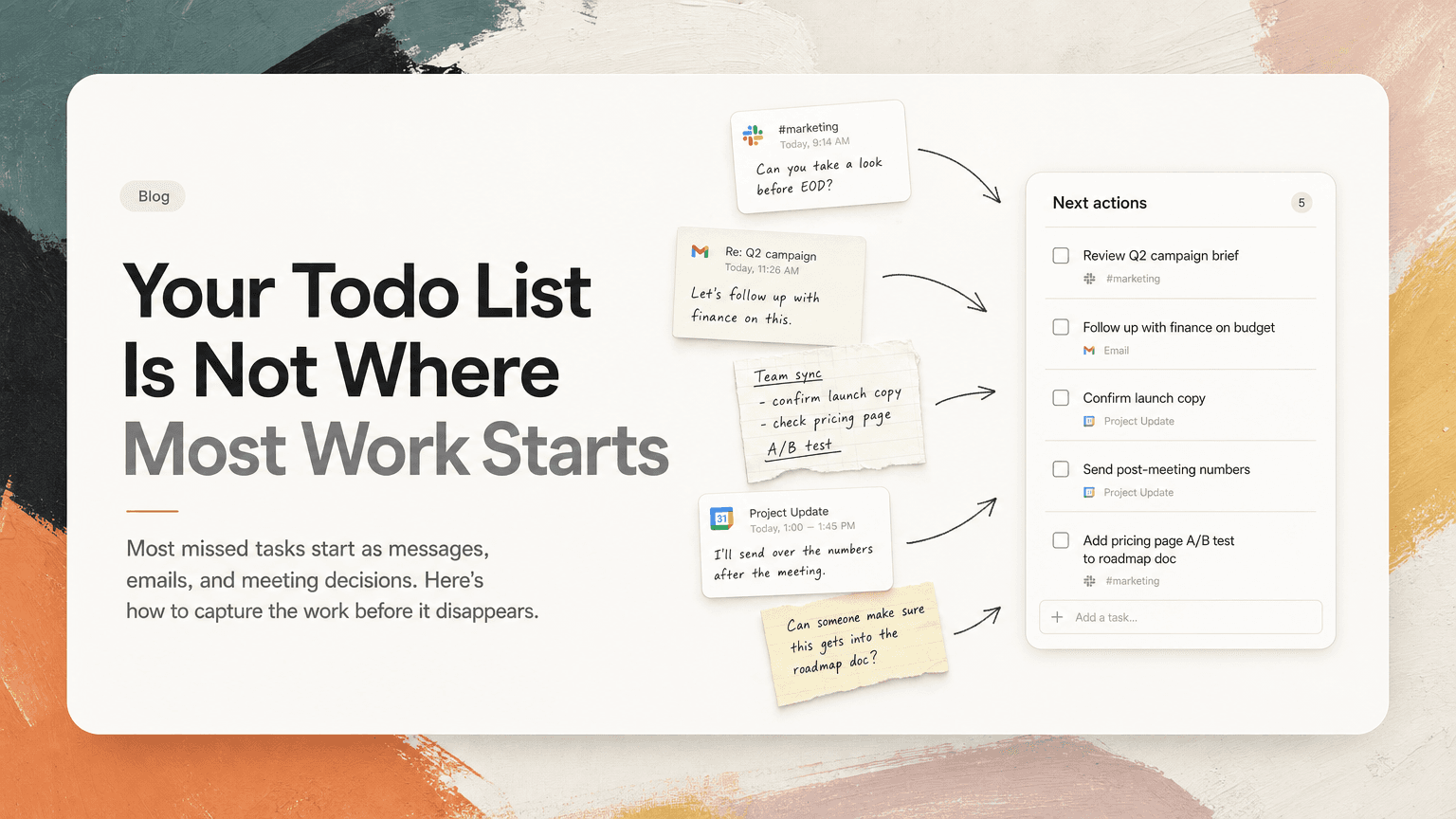
A modern workday does not begin in a todo app. It begins in Slack threads, Gmail replies, calendar invites, meeting notes, docs, customer calls, and quick comments that sound harmless in the moment:
- “Can you take a look before EOD?”
- “Let’s follow up with finance on this.”
- “We should confirm the launch copy.”
- “I’ll send over the numbers after the meeting.”
- “Can someone make sure this gets into the roadmap doc?”
Some of these become tasks. Many do not. They remain trapped in the place where they were mentioned, waiting for you to remember them later.
A todo list is useful for organizing known work. It is much worse at discovering hidden work.
The real issue is capture, not discipline
When a task falls through the cracks, it is tempting to blame discipline. You should have written it down. You should have reviewed the thread. You should have processed the meeting notes right away.
Sometimes that is true. But often the system is flawed.
A traditional todo list depends on manual capture. You have to notice that something is a task, switch tools, create the task, add context, maybe assign a due date, and then return to what you were doing.
That sounds simple until you place it inside a real day:
- You are deep in a document.
- Slack pings with a question from engineering.
- You answer, and someone asks you to check a customer impact note.
- Gmail shows a partner follow-up.
- A meeting starts in three minutes.
- During the meeting, three decisions create four new action items.
- After the meeting, you jump into another thread about a blocked launch task.
At no point did you decide to ignore work. The work simply arrived faster than your capture habit could process it.
The result is a todo list that looks clean but incomplete. It contains the tasks you had time to formalize, not the tasks you actually owe.
Where todo lists usually miss work
If you want a more reliable system, start by looking at where work gets created. These are the common leak points.
1. Slack threads that end with implied ownership
Slack is full of almost-tasks. The dangerous ones do not always use clear language.
A teammate writes:
“Looks good. Maybe we should double-check the onboarding copy against the new pricing page.”
No one assigns it. No due date appears. But if you are the product manager in the thread, you may be expected to handle it.
Or someone says:
“Can we get this into the customer update before Friday?”
That is a task, even if it never becomes a ticket.
The issue is that Slack blends discussion, decisions, questions, and commitments in the same stream. A todo list only captures what you extract from that stream.
2. Email follow-ups that hide inside replies
Gmail is another common source of missed work because follow-ups often arrive as part of a longer conversation.
For example:
“Thanks for sending this. Could you also share the implementation timeline and confirm whether legal has reviewed the latest terms?”
That is at least two tasks:
- Send the implementation timeline
- Confirm legal review status
If you only star the email, you have not really captured the work. A star means “look at this later.” It does not say what needs to happen, by when, or what information is needed.
Email also creates delayed obligations. You reply, “I’ll get back to you tomorrow,” then move on. Unless that promise becomes a task, tomorrow depends on memory.
3. Meetings that produce decisions but not execution
Meetings often feel productive because decisions get made. But decisions are only useful if they turn into next actions.
A meeting note might say:
“Decision: Move launch to Wednesday. Need updated comms plan, sales enablement note, and revised QA timeline.”
That note contains multiple tasks, likely owned by different people. If the meeting ends and everyone leaves with a vague sense of alignment, the work is still fragile.
The most common failure is not forgetting the meeting. It is losing the connective tissue between the decision and the execution:
- Who owns the comms plan?
- Where is the latest version?
- What changed because launch moved?
- Which Slack thread discussed the risk?
- What needs to happen today versus later?
A todo item that says “update launch plan” is better than nothing, but it may still be too thin to execute without reopening five tabs.
4. Repeated asks that create duplicate tasks
When work is scattered, the same task may appear in multiple places.
A customer request comes in by email. A salesperson mentions it in Slack. It comes up again in a weekly meeting. Someone adds it to a shared doc.
If you manually capture each instance, you might end up with three versions of the same task:
- “Review customer request from Acme”
- “Follow up on Acme issue”
- “Check enterprise customer blocker”
Duplicates create noise. They also create uncertainty. Did you already handle this? Is this a new request? Is someone else working on it?
A bloated todo list can be just as unreliable as an incomplete one.
A better model: treat communication as the source of tasks
Instead of thinking of your todo list as the place where work begins, treat it as the place where work is clarified.
The source of work is communication:
- Slack creates fast-moving asks and decisions.
- Gmail creates external commitments and follow-ups.
- Calendar creates meeting-driven actions.
- Notes capture decisions, risks, and open questions.
Your system should be designed around that reality.
The goal is not to write down more tasks. The goal is to capture tasks closer to where they originate, with enough context to act on them later.
That means every useful task should answer four questions:
- What needs to happen?
- Who is responsible?
- When does it matter?
- Where did the context come from?
If any of these are missing, the task is likely to become either forgotten or expensive to restart.
How to audit your hidden work
You can do a simple audit without changing tools.
Pick one normal workday. At the end of the day, compare your todo list against the places where work actually happened.
Check Slack
Look at:
- Threads where you were mentioned
- Channels tied to active projects
- DMs with your manager, teammates, or customers
- Messages you reacted to as a reminder
- Threads where you said “I’ll” or “we should”
For each thread, ask: did this create an action, decision, follow-up, or dependency?
If yes, is it on your list?
Check Gmail
Search your sent mail for phrases like:
- “I’ll follow up”
- “I can send”
- “Let me check”
- “I’ll confirm”
- “tomorrow”
- “next week”
These phrases often reveal commitments you made but did not capture.
Then check important inbound emails. Look for asks hidden in paragraphs, especially emails with multiple questions.
Check meetings
Review today’s calendar and notes. For each meeting, identify:
- Decisions made
- Open questions
- Follow-ups promised
- Owners named
- Dates mentioned
If a meeting produced no next actions, that may be fine. But if it produced actions and they are not written anywhere executable, the work is at risk.
Check duplicates
Finally, scan your existing list for repeated items. If two tasks point to the same outcome, merge them and keep the richest context.
This matters because prioritization depends on clarity. You cannot choose the most important work if the same obligation appears under three names.
Turn captured work into clear next actions
Once you find hidden work, resist the urge to dump everything into a vague list. Convert each item into a next action.
Weak task:
“Customer onboarding”
Better task:
“Send revised onboarding timeline to Maya after confirming legal review status.”
Weak task:
“Launch meeting follow-up”
Better task:
“Update launch comms plan with Wednesday date and share in #launch by 3 PM.”
Weak task:
“Pricing page”
Better task:
“Compare onboarding copy against new pricing page and flag mismatches in the doc.”
A good next action should be boringly specific. You should be able to start it without reconstructing the entire conversation.
Prioritize by consequence, not by recency
When tasks come from communication tools, the newest item often feels the most urgent. Slack especially rewards recency. The latest ping sits at the top of your attention, even if it is less important than an older commitment.
A practical prioritization pass should separate urgency from consequence.
Ask:
- What blocks other people?
- What affects a customer or external partner?
- What has a real deadline today?
- What reduces risk for an active project?
- What can wait without meaningful cost?
This helps you avoid spending the morning clearing easy Slack asks while missing the one email follow-up that unblocks a contract, launch, or customer issue.
Reduce context switching by keeping the source attached
Capturing the task is only half the system. The other half is preserving context.
A task without context creates a second task: go find the context.
If your list says “follow up with Sam,” you still have to remember which Sam, about what, based on which thread, with what latest decision.
Whenever possible, keep a link or reference to the source:
- The Slack thread where the decision happened
- The Gmail conversation with the request
- The meeting note with the owner and deadline
- The doc where the final wording lives
This reduces context switching because you are not starting from scratch every time you resume work.
This is where tools like CTRL can help: instead of asking you to manually recreate every task, CTRL connects to places like Slack, Gmail, Calendar, meetings, and notes so scattered communication can become clearer next actions with the relevant context nearby.
The checklist: make your todo list reflect reality
Use this checklist at the end of each day or before planning the next one:
- Did any Slack thread create an ask, owner, decision, or follow-up?
- Did any email contain more than one request?
- Did I promise to send, confirm, review, or follow up on anything?
- Did any meeting create actions that are not assigned?
- Are there repeated versions of the same task?
- Does each task have enough context to start without searching?
- Have I prioritized based on impact, not just newest message?
You do not need a perfect system. You need one that notices work where work actually starts.
The point of a todo list is trust
A todo list is not valuable because it is long. It is valuable because you trust it.
If half your work lives outside the list, you will keep checking Slack, rereading email, reopening meeting notes, and relying on memory. That creates the feeling of being busy even when the list looks manageable.
The fix is not to abandon todo lists. It is to stop treating them as the source of truth unless they are connected to the sources of work.
Your real workload is already visible. It is just distributed across conversations, meetings, and decisions. The practical move is to capture it earlier, deduplicate it, attach the context, and turn it into specific next actions.
That is how a todo list becomes useful again: not as a place to store everything you remember, but as a clear view of what your work actually requires.


Make today life changing
Move from conversation to actions in seconds
Download the ^ctrl desktop app