By Ctrl Editorial Team · June 3, 2026 · 9 min read
A Product Team’s Guide to Keeping Context Attached to the Work
A practical system for preserving decisions, asks, and rationale across Slack, Gmail, meetings, and task lists.
Product teams rarely lose work because nobody cared.
They lose work because the context was split across five places.
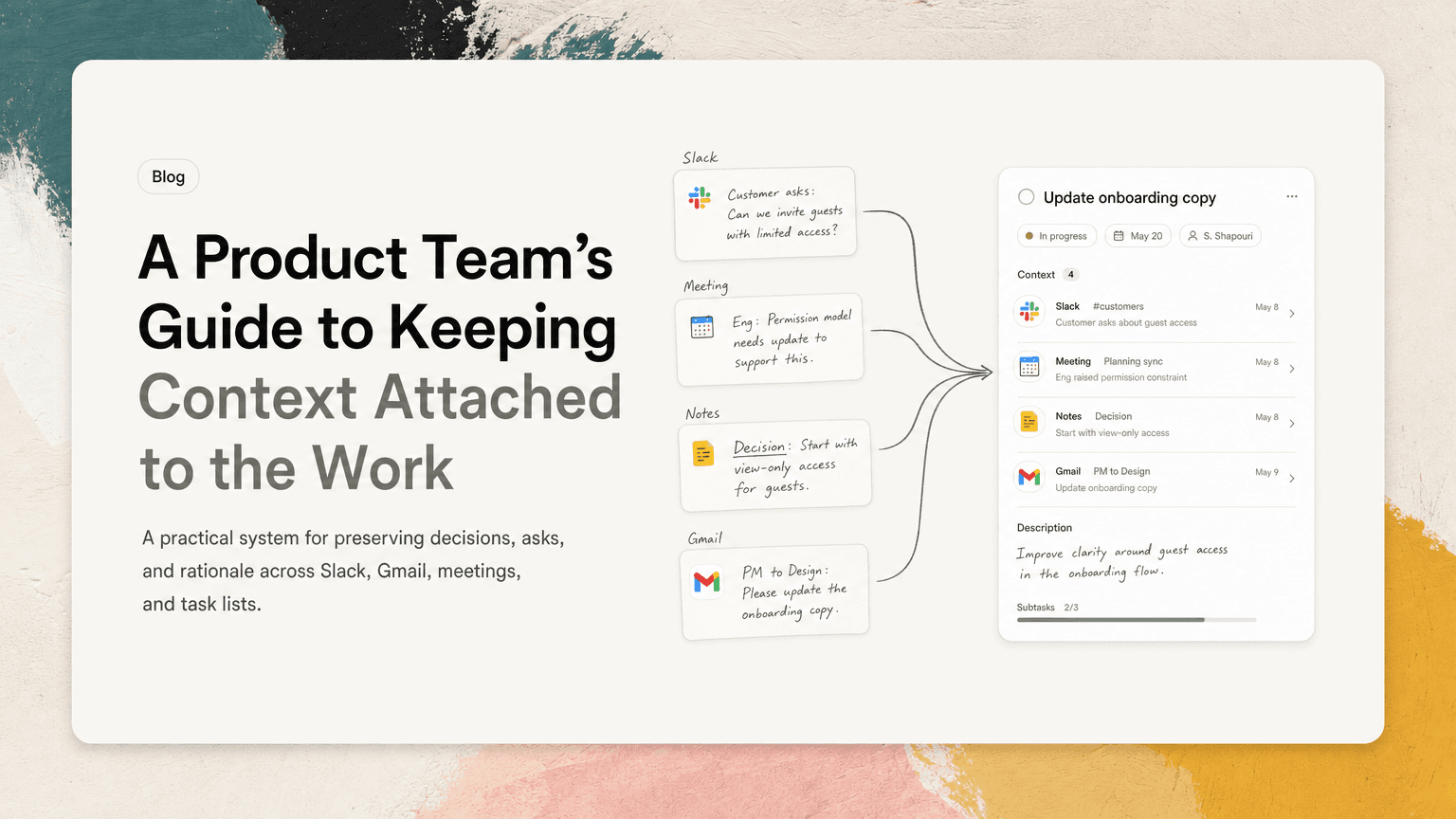
A customer concern starts in Slack. A PM clarifies it in a thread. An engineer raises a constraint in a planning meeting. A decision gets written in a doc. A follow-up lands in Gmail. Two days later, someone adds a task to the roadmap board that says: “Update onboarding copy.”
That task is technically correct. It is also dangerously thin.
Why are we updating it? Which customer problem are we solving? What constraint changed? Who needs to approve it? What did we decide not to do?
When product teams preserve context, they move faster because they do not have to rediscover the same information every time work changes hands. This post lays out a practical system for keeping the “why,” “what changed,” and “who said what” attached to the work itself.
Context is not the same as documentation
Documentation is where teams store durable information. Context is the live reasoning around a piece of work.
Documentation might say:
Enterprise users can invite teammates from the workspace settings page.
Context might say:
Sales heard from two prospects that invite permissions are confusing. Support confirmed existing customers hit the same issue. Engineering said the settings page can be changed this sprint, but role-based permissions should wait until later.
Both matter, but they behave differently.
Documentation is cleaned up. Context is messy. It lives in Slack threads, Gmail replies, meeting transcripts, calendar notes, comments, and quick decisions made in the margins.
The mistake many product teams make is trying to preserve context by asking people to manually summarize everything. That works for a week. Then the team gets busy, the summaries get shorter, and the next action becomes detached from the reason it exists.
The better approach is to build a simple context-preservation habit into the way work moves.
The three pieces of context every product task needs
Most product work does not need a long brief. It does need three things.
1. The trigger
What caused this work to exist?
Examples:
- A customer escalated a confusing billing state.
- An engineer noticed a reliability risk during implementation.
- A founder asked for a tighter onboarding flow before a launch.
- A support trend showed repeated confusion around permissions.
- A competitor change made an existing gap more visible.
The trigger prevents the task from becoming generic. “Improve activation” is vague. “Fix the empty state that causes new admins to abandon invite setup” is much easier to reason about.
2. The decision
What has already been decided?
Examples:
- We are changing copy, not rebuilding the flow.
- We are prioritizing the admin path over the member path.
- We are not adding new permission controls this sprint.
- Design will provide a quick revision, not a full exploration.
- Success will message affected accounts after the fix ships.
This matters because product teams waste enormous energy reopening decisions that were already made somewhere else. If the decision stays in the meeting notes but not with the task, the team will debate it again in Slack.
3. The unresolved question
What still needs judgment?
Examples:
- Does the change need legal review?
- Should this apply to existing workspaces or only new ones?
- Is this a bug fix or a product improvement?
- Who owns customer communication?
- What tradeoff are we making against the current sprint goal?
Unresolved questions are not a failure. They are useful when they are visible. Hidden questions become blockers.
Build a context trail, not a perfect archive
A context trail is a lightweight chain from the work item back to the relevant source material.
It does not require every message, every meeting note, or every version of every doc. It only needs enough source context for someone to understand why the work exists and what happened before it reached them.
For example, a good task might look like this:
Task: Revise admin invite empty state before workspace launch
Trigger: Support flagged repeated confusion from new admins who do not know whether invites were sent.
Decision: Use copy and visual state changes only. No permission model changes this sprint.
Open question: Should success notify current beta accounts when this ships?
Sources: Support Slack thread, Tuesday product review, design note.
This is not heavy documentation. It is an execution-ready task with context attached.
The goal is not to create a museum of every conversation. The goal is to make the next person effective without asking them to search Slack, Gmail, meeting notes, and the roadmap board separately.
Where product context usually breaks
Product teams tend to lose context at handoff points. Watch these closely.
Slack thread to task
Slack is often where work is discovered. A customer-facing teammate posts a pattern. A PM asks a few clarifying questions. An engineer explains a limitation. Someone says, “Let’s fix this.”
Then the task created later says:
Fix invite flow confusion.
The thread had the nuance. The task has the label.
When moving from Slack to a task, capture the trigger, the decision, and the unresolved question immediately. If the thread is long, do not summarize everything. Pull out the parts that affect action.
A useful Slack-to-task habit:
- Name the concrete user or team problem.
- Include the current decision.
- Link or reference the thread.
- Add the next owner.
- Add one open question if there is one.
Meeting to execution
Meetings create a lot of apparent alignment. Everyone nods. The plan feels clear. Then people leave and translate the discussion into their own tools.
This is where context fragments.
A PM writes roadmap notes. Design updates a Figma comment. Engineering adds a ticket. Customer success sends a follow-up email. Each version is slightly different.
At the end of a product meeting, do not settle for “notes.” Create a short decision block:
- What changed?
- What is the next action?
- Who owns it?
- What source context should travel with it?
- What is explicitly not included?
The last question is especially useful. “Not included” prevents scope creep later.
Example:
We will update the admin invite empty state this sprint. Design owns revised copy and layout by Wednesday. Engineering will implement copy and state changes only. Role permissions are out of scope.
That is much better than a meeting note that says:
Discussed invite experience.
Gmail to roadmap
Email often carries high-value product context because it includes customers, partners, executives, vendors, and prospects. But email follow-ups are easy to miss because they sit outside the team’s main execution systems.
A customer email might include the exact sentence that explains why a feature is confusing. If that sentence never reaches the task, the team may solve the wrong problem.
When converting email into product work, preserve:
- The customer’s actual framing of the problem.
- Any deadline or dependency mentioned.
- Whether this is one account, a segment, or a broader pattern.
- Who needs a follow-up when the work is done.
Do not paste an entire email chain into a task. Extract what changes the work.
Use a simple context template
A lightweight template makes context preservation easier without turning every task into a product requirements document.
Use this for any task that came from Slack, Gmail, meetings, or shared notes:
## Context
Trigger:
Decision:
Open question:
Source:

## Next action
Owner:
Due or review date:
Definition of done:
Here is a filled-out version:
## Context
Trigger: New admins do not realize invite emails were sent after setup.
Decision: Improve the empty state with clearer copy and status. No permission changes this sprint.
Open question: Should customer success notify beta accounts after release?
Source: Support Slack thread and Tuesday product review.

## Next action
Owner: Design for revised state, then engineering for implementation.
Due or review date: Review in Thursday product/design sync.
Definition of done: Admin can see whether invites were sent and what to do next.
This is short enough to use in real work. It also gives anyone joining later the minimum viable context.
Make prioritization depend on context, not just labels
A task list without context tends to reward the loudest or most recent work. Everything becomes “urgent” because the underlying reason is missing.
Context makes prioritization sharper.
Compare these two tasks:
- “Update onboarding empty state”
- “Update onboarding empty state because new admins cannot tell whether invites were sent, blocking workspace activation before launch”
The second one is easier to prioritize. It includes the user problem, the business timing, and the reason it matters now.
When reviewing product priorities, ask:
- What triggered this work?
- Is the decision already made or still open?
- Does this unblock someone else?
- Is there a customer or launch dependency?
- What happens if we do not do it this week?
If nobody can answer those questions, the team may not need more urgency. It may need more context.
Deduplicate repeated asks before they become separate workstreams
Product teams often create duplicate work because the same issue appears in different tools.
A founder mentions churn risk in Slack. A customer success manager sends a Gmail thread about a confused account. A PM captures a meeting note from a roadmap review. An engineer files a related bug.
These may be four separate signals about the same underlying problem.
Before creating a new task, check whether the ask already exists in another form. If it does, add the new source context to the existing work instead of creating a parallel item.
This is where an intelligent work assistant can help. CTRL connects to the places where work already happens, like Slack, Gmail, Google Calendar, meetings, and shared notes, so scattered asks can be turned into clearer next actions with useful context attached. The point is not to replace product judgment. It is to reduce the manual hunting and copying that causes context to decay.
Assign an owner for context, not just execution
Every important product task needs an execution owner. Some also need a context owner.
The context owner is responsible for making sure the reasoning stays current as decisions change.
This does not need to be a formal role. It is often the PM, operator, tech lead, or whoever is closest to the decision. Their job is to update the task when:
- The scope changes.
- A decision is reversed.
- A customer adds new information.
- A dependency appears.
- A meeting changes the plan.
Without this, teams end up executing against stale context. That is how you get technically completed work that no longer matches the problem.
A weekly context reset for product teams
Once a week, review the work that crossed tools.
Pick the tasks that came from Slack, Gmail, meetings, or customer conversations. For each, check:
- Is the trigger clear?
- Is the latest decision attached?
- Are open questions visible?
- Are duplicate asks merged?
- Can a new person understand the work without searching three tools?
This review can be quick. The goal is not to polish every task. The goal is to catch context loss before it turns into rework.
A practical rhythm:
- Monday: Review priority tasks for missing context.
- Midweek: Update tasks after product/design/engineering meetings.
- Friday: Merge duplicate asks and close the loop on decisions.
A tool like CTRL can support this rhythm by helping surface tasks and context from the systems where they originated, but the operating principle matters more than the software: context should travel with the work.
The real goal: less rediscovery
Preserving context is not about writing more. It is about asking your team to rediscover less.
Less “Where did this come from?”
Less “Didn’t we already decide that?”
Less “Is this still important?”
Less switching between Slack, Gmail, meeting notes, docs, and task boards just to understand the next step.
Product work will always move across tools. That is not the problem. The problem is letting the reason for the work get stripped away each time it moves.
Keep the trigger, decision, and unresolved question attached. Link back to the source when it matters. Merge duplicate asks. Update context when decisions change.
That small discipline makes product teams calmer, faster, and much less dependent on memory.


Make today life changing
Move from conversation to actions in seconds
Download the ^ctrl desktop app