By Ctrl Editorial Team · June 6, 2026 · 9 min read
A Simple Workflow for Turning Slack Threads Into Action
Slack is good at surfacing work, but bad at holding commitments. Use this workflow to turn messages into clear, owned tasks.
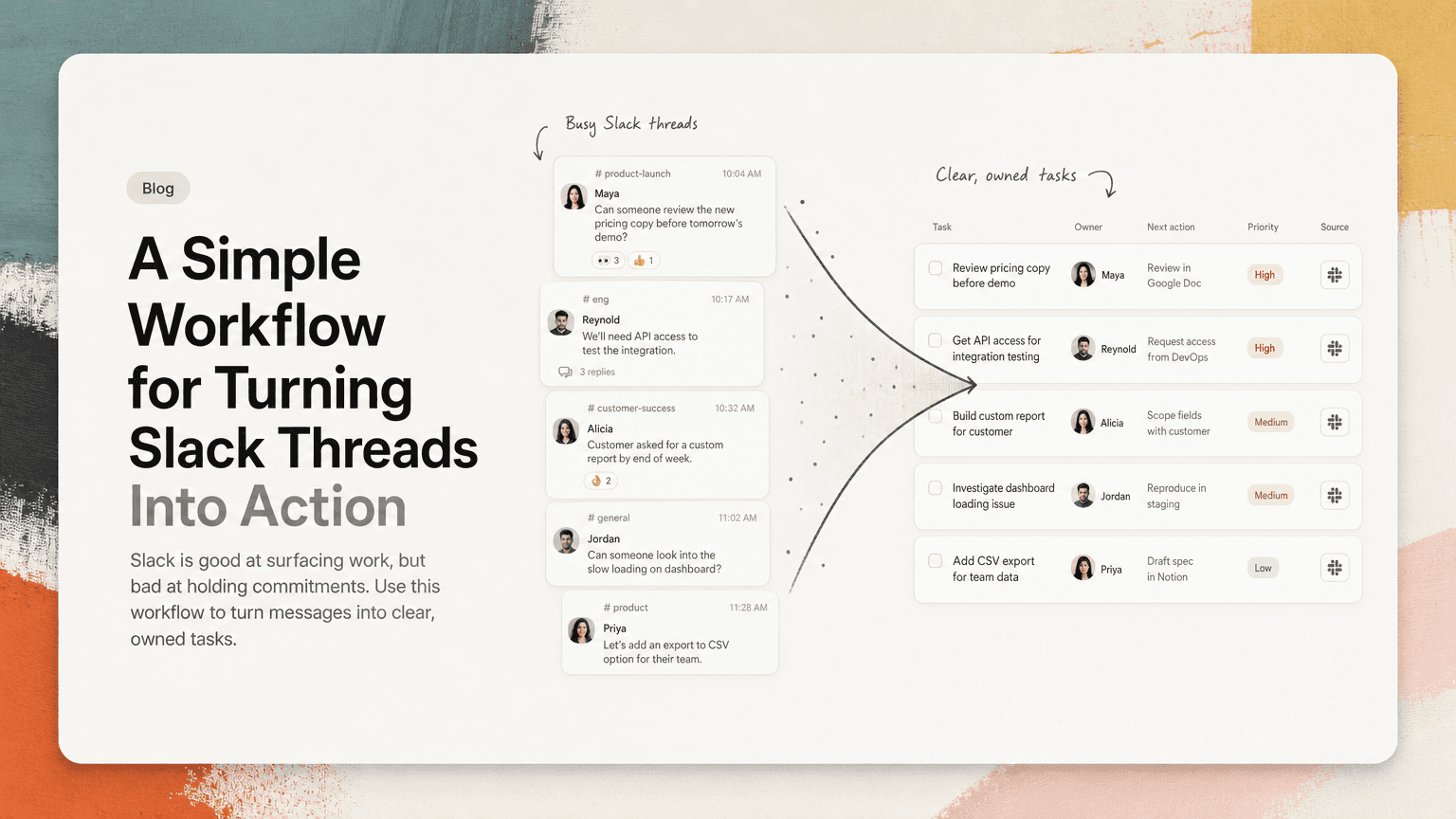
Slack is where a lot of work is discovered. A customer asks a question. An engineer flags a dependency. A founder drops a “can someone check this?” in a channel. A product manager asks for a follow-up after a launch review.
The problem is that Slack is not designed to hold commitments for long.
A message can look important at 10:04 a.m. and be buried by lunch. Threads split the context. Reactions create false confidence. Someone says “I’ll take a look” but never turns that into a concrete task. By the end of the day, the work technically exists, but only as a memory test.
The fix is not to treat every Slack message as a task. That creates noise. The fix is to use a clear filter and conversion workflow so only real commitments become real work.
Slack messages are not tasks yet
A Slack message usually has only part of what a task needs.
It might include the request:
“Can we update the pricing copy before tomorrow’s demo?”
But it may not include:
- who owns it
- what “update” means
- where the copy lives
- when it needs to be done
- whether it blocks anything else
- what decision led to the request
That is why forwarding messages into a task manager often fails. You move the message, but not the work. A useful task needs enough shape that someone can act on it later without rereading an entire thread.
The goal is to convert Slack messages into tasks with five things: action, owner, deadline, context, and priority.
Step 1: Decide whether the message is actually a task
Not every message deserves a spot on your task list. Before capturing anything, ask one question:
Does this require a future action from a specific person?
If the answer is no, it is probably not a task.
Usually not a task
These messages may be useful, but they do not automatically become work:
- “FYI, the API response changed.”
- “I like option B.”
- “The customer mentioned this again.”
- “Shipping today.”
- “Here’s the doc.”
They might be context, decisions, or updates. Capture them only if they create a next action.
Usually a task
These are stronger candidates:
- “Can you send the revised contract to legal?”
- “We need to follow up with Ana before Friday.”
- “Please add the onboarding bug to the sprint board.”
- “Someone should confirm whether this affects Gmail sync.”
- “Let’s update the launch checklist with this dependency.”
The phrase “someone should” is especially dangerous. It sounds like a task, but has no owner. Your job is to turn that vague obligation into a specific commitment.
Step 2: Rewrite the message as a next action
A Slack message often describes a problem. A task should describe the next physical or digital action.
Weak task:
Pricing page issue
Better task:
Review pricing page hero copy and send suggested edits to Mia before Thursday’s customer demo
The better version answers what to do, where to do it, who is involved, and why timing matters.
Use verbs that make the work concrete:
- Review
- Send
- Draft
- Confirm
- Schedule
- Update
- Ask
- Decide
- Add
- Share
Avoid vague verbs when possible:
- Handle
- Look into
- Sync on
- Deal with
- Think about
- Follow up
“Follow up” can be valid, but only if you include who, about what, and by when.
Instead of:
Follow up on enterprise account
Write:
Email Jordan at Acme to confirm whether procurement needs the updated security questionnaire by Friday
That task is much easier to complete because it removes the small decisions that create friction later.
Step 3: Attach the source context
One reason Slack-derived tasks fail is that they lose the thread.
You copy a sentence into a task list, then two days later you wonder:
- Who asked for this?
- Was this urgent or just a suggestion?
- What did we already decide?
- Is there a related file?
- Did someone else already start it?
Whenever possible, attach the original Slack message or thread link to the task. The task should be readable on its own, but the source should be one click away.
This matters most for work that depends on nuance:
- customer-facing follow-ups
- product decisions
- engineering tradeoffs
- launch coordination
- hiring loops
- legal or finance requests
A task without source context can become a guessing game. A source-linked task gives the owner a clean next action while preserving the “why” behind it.
Step 4: Assign an owner before it leaves Slack
A task without an owner is just shared anxiety.
Slack makes this easy to avoid because the people involved are already in the conversation. Before converting the message, clarify ownership in the thread:
“I can take this. I’ll update the launch checklist by EOD.”
Or:
“Sam, can you own the customer follow-up? I’ll handle the product note.”
Or:
“Is this for engineering or support to resolve?”
Do not rely on reactions as ownership. A thumbs-up can mean “I agree,” “I saw this,” “sounds good,” or “I am taking it.” Those are not the same thing.
If your team uses emoji conventions, make them explicit. For example:
- 👀 means “I am looking at this, not necessarily owning it”
- ✅ means “done”
- 🙋 means “I’ll own this”
Even then, the final task should still have a named owner.
Step 5: Add a due date only when it changes behavior
Not every Slack task needs a due date. Fake deadlines make task lists noisy and easy to ignore.
Use a due date when timing matters:
- a customer is waiting
- a meeting depends on it
- a launch or handoff is blocked
- someone needs it before they can do their work
- the task will become more expensive if delayed
If timing does not matter, use priority instead of a random date.
For example:
Draft answers to the customer’s integration questions before Thursday’s renewal call
This needs a due date because the meeting creates a real constraint.
But:
Clean up old labels in the support triage channel
This may be useful, but it probably does not need to pretend to be due tomorrow.
Step 6: Deduplicate repeated asks
Slack often creates duplicate tasks because the same work appears in multiple places.
A customer issue might show up in:
- a support channel
- a product channel
- a DM from a founder
- a meeting recap
- an email from the account team
If each mention becomes a separate task, the team wastes time managing copies of the same commitment.
Before creating a new task, check whether the work already exists. If it does, update the existing task with the new context instead of creating another one.
Example:
Original task:
Investigate why workspace admins cannot export audit logs
New Slack message:
“Acme just reported the same audit log export issue. They need an update before their security review.”
Do not create a second task called “Acme audit log issue.” Add the customer context and timing to the existing task:
Investigate audit log export failure affecting workspace admins; include Acme update before security review
This keeps the work unified while making the priority clearer.
Step 7: Triage Slack tasks at set times
Trying to turn every Slack message into a task in real time creates constant context switching. You read a thread, open your task tool, rewrite the action, check your calendar, return to Slack, and then forget what you were doing before.
A better pattern is to triage Slack at set points in the day.
For example:
Morning triage
Look for anything that became urgent overnight:
- customer escalations
- meeting-related tasks
- launch blockers
- requests from leadership or cross-functional teams
Convert only the work that needs action today or needs to be assigned today.
Midday sweep
Check active project channels and threads where you were mentioned. Capture tasks that would otherwise interrupt your afternoon focus.
End-of-day closeout
Review unresolved mentions, saved messages, and important threads. Convert lingering commitments before they become tomorrow’s mystery.
The goal is not to process Slack perfectly. It is to prevent important work from depending on memory.
A lightweight template for Slack-derived tasks
When you convert a Slack message into a task, use this structure:
Verb + object + context + owner + time constraint
Examples:
- Send revised onboarding email copy to the success team before Wednesday’s rollout
- Confirm with Priya whether the billing bug affects annual plan upgrades
- Add the agreed API rate-limit note to the launch FAQ
- Draft a response to the customer’s SSO questions and share it with sales for review
- Schedule a 20-minute decision meeting for the unresolved permissions tradeoff
For more complex work, add a short context note:
Source: Slack thread in
#launch-planningwhere Mia confirmed the demo deadline and Ben flagged the dependency on legal review.
That note gives the owner enough background without forcing them to reconstruct the conversation.
Where AI can help without taking over
The most tedious part of this workflow is not deciding what matters. It is repeatedly finding, rewriting, deduplicating, and linking the work scattered across Slack and other tools.
This is where an assistant can be useful. CTRL connects to places like Slack, Gmail, Google Calendar, meetings, and shared notes, then helps turn scattered communication into clear next actions. Instead of manually copying every promising message, you can review suggested tasks with context attached and decide what should actually move forward.
The human judgment still matters: what is important, what can wait, who should own it, and whether the task is worth doing at all. The assistant reduces the capture burden so you can spend more attention on those decisions.
Common mistakes to avoid
Capturing messages without rewriting them
A pasted Slack message is rarely a good task. Rewrite it so the next action is obvious.
Treating every mention as urgent
Being tagged does not always mean something is important. Separate visibility from commitment.
Losing the thread link
If the task depends on a decision, customer detail, or technical nuance, preserve the source.
Creating duplicate tasks from duplicate chatter
Repeated discussion does not always mean repeated work. Merge related asks when they point to the same outcome.
Letting Slack become the task list
Saved messages, pins, and reminders can help temporarily, but they are not a durable system for execution across a busy team.
The real goal: fewer loose ends
Turning Slack messages into tasks is not about becoming more organized for its own sake. It is about reducing loose ends.
A good Slack-to-task workflow makes commitments visible. It gives each piece of work an owner. It preserves the context that explains why the work matters. It prevents the same request from being rediscovered in five places. And it gives you a calmer way to prioritize instead of reacting to whichever channel is loudest.
Slack is excellent for conversation. Execution needs a different shape.
When a message becomes a clear next action, with ownership and context attached, it stops being chat. It becomes work someone can actually finish.


Make today life changing
Move from conversation to actions in seconds
Download the ^ctrl desktop app