By Ctrl Editorial Team · May 19, 2026 · 9 min read
How Product Teams Can Keep Context From Getting Lost Across Tools
A practical system for preserving decisions, rationale, owners, and next actions across Slack, Gmail, meetings, docs, and task lists.
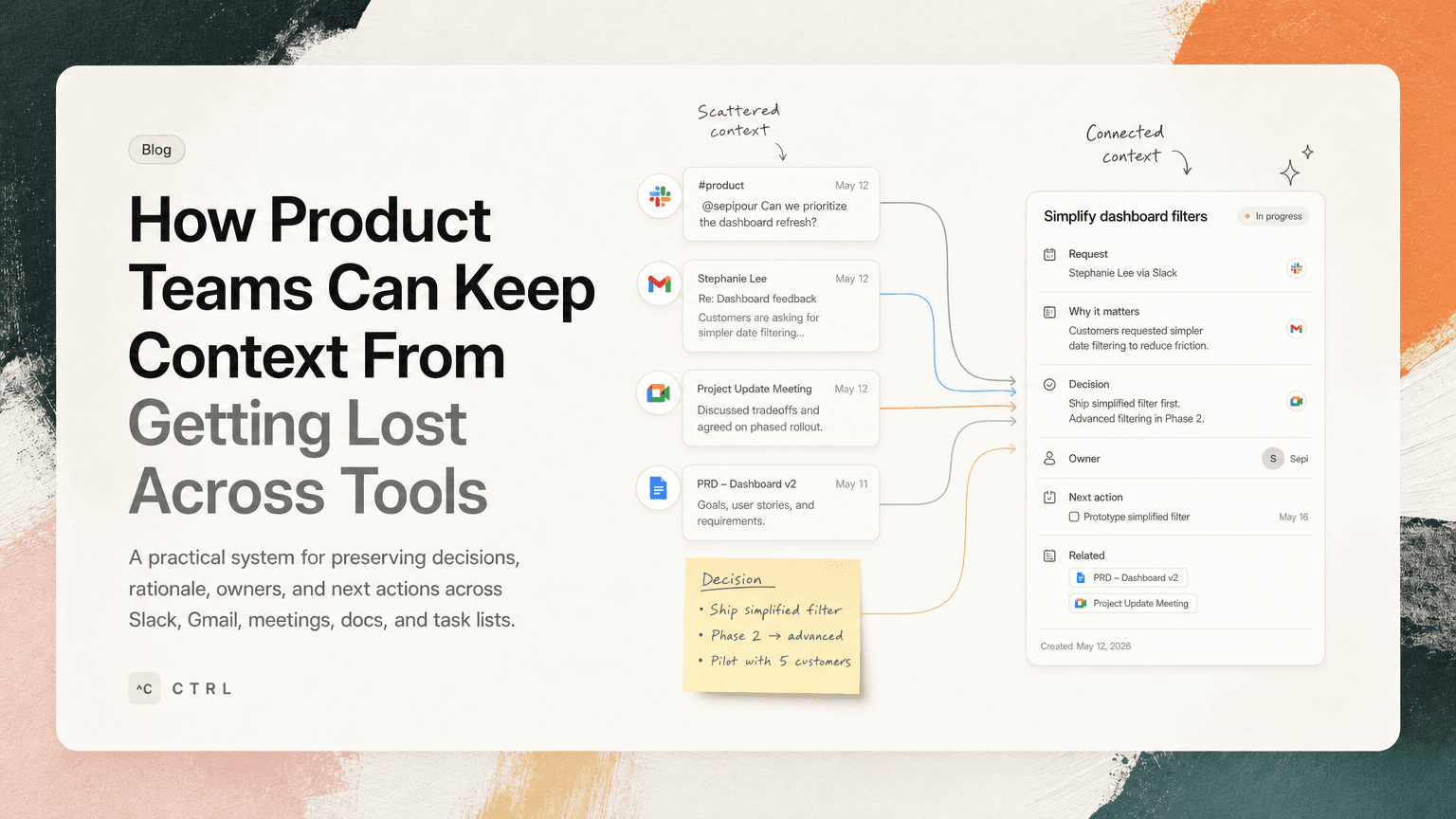
Product work rarely lives in one place.
A customer concern starts in Slack. The supporting detail is in Gmail. The decision happens in a meeting. The implementation plan lands in a project tracker. Two weeks later, someone asks why the team chose one tradeoff over another, and everyone starts searching.
This is not a documentation problem alone. It is a context preservation problem.
Product teams move fast because they communicate across many tools. But the same speed creates a trail of half-attached information: decisions without rationale, tasks without source material, priorities without customer context, and meeting notes that never make it into execution.
The goal is not to force everyone into one perfect tool. That usually fails. The goal is to make context portable enough that it follows the work.
What “context” actually means
Context is the information someone needs to make a good decision or complete a task without reopening five apps.
For product teams, that usually includes:
- The original request: What was asked, by whom, and where?
- The reason: Why does this matter now?
- The decision: What did the team choose to do or not do?
- The owner: Who is responsible for the next step?
- The deadline or trigger: When does this need attention?
- The related artifacts: Customer email, Slack thread, design doc, meeting notes, ticket, dashboard, or spec.
- The latest state: Has anything changed since the task was created?
A task that says “Update onboarding copy” is weak. A task that says “Update onboarding copy to address confusion from three enterprise trials; Sarah shared examples in Gmail thread; decision from Monday product review was to test a shorter setup checklist first” is much stronger.
The second version reduces guessing. It also protects the team from relitigating decisions.
Where product context gets lost
Context usually disappears during handoffs. The work changes shape as it moves from one surface to another.
Slack turns decisions into archaeology
Slack is excellent for fast discussion. It is also where decisions get buried.
A typical pattern:
- A customer-facing teammate posts a customer issue in a channel.
- A PM asks a clarifying question.
- An engineer explains a constraint.
- A designer suggests a smaller fix.
- Someone says, “Let’s do that for this release.”
- The thread goes quiet.
A week later, the task exists somewhere else, but the reasoning does not. The team remembers the outcome, not the path that led there.
Gmail hides follow-ups in polite language
Email often contains work disguised as conversation.
Examples:
- “Could you send over the revised rollout plan by Friday?”
- “Looping in Priya, who can confirm the API behavior.”
- “We should follow up once legal reviews the updated terms.”
- “Can you clarify whether this applies to existing customers?”
These are tasks, dependencies, and open questions. If they stay in the inbox, they rely on memory.
Meetings create notes, not execution
Meeting notes often capture what was discussed, but not what should happen next.
A product review might produce:
- “Discussed activation drop-off”
- “Need to align with lifecycle team”
- “Engineering concerned about scope”
That is useful, but incomplete. The real execution layer is:
- Who is checking the activation data?
- What decision was made about scope?
- Who is talking to lifecycle?
- What artifact should be updated?
- When will the decision be revisited?
Without that, the meeting creates a record but not momentum.
Task lists strip away rationale
Task managers are good at showing what needs to happen. They are often less good at preserving why.
By the time a Slack thread becomes a task, it may have lost the nuance that made the task important. The task title becomes a placeholder: “Fix dashboard export bug.”
But which customer hit it? Is it blocking a renewal? Is the issue only in CSV exports? Did engineering already identify the likely cause? Was there a decision to patch now and redesign later?
If those details are not attached, the owner has to reconstruct them.
A simple system for preserving context
You do not need a heavy process. You need a few habits that make context harder to lose.
1. Capture the source, not just the task
Whenever you create a task from Slack, Gmail, a meeting, or a doc, include the source link.
Bad:
Follow up on SSO issue
Better:
Follow up on SSO issue raised by Acme in email thread from May 12. Confirm whether SCIM provisioning is part of the ask.
Best:
Follow up on SSO issue raised by Acme in email thread from May 12. Source: Gmail thread. Need to confirm whether SCIM provisioning is part of the ask before scoping. Owner: Maya. Next step: reply with clarification questions by Thursday.
The source matters because it gives the owner a way back to the full conversation. It also prevents secondhand summaries from becoming the only record.
2. Separate decisions from discussion
Most product conversations contain a mix of opinions, constraints, questions, and decisions. If you do not mark the decision clearly, it blends into the discussion.
Use a simple format in Slack threads, meeting notes, or docs:
Decision: Ship the shorter onboarding checklist in the next release.
Rationale: The current checklist creates confusion during setup, and support has seen repeated questions about step order.
Next action: Nina will update the copy and share a draft by Wednesday.
Open question: Should the empty-state illustration change too?
This format is not fancy. That is why it works. It makes the durable part of the conversation easy to extract.
3. Attach rationale to the next action
A task should not only say what to do. It should say why the work exists.
This is especially important for engineering and design tasks that originate from product discussions. Without rationale, teams optimize locally. With rationale, they can make better tradeoffs.
Compare:
Add confirmation step before deleting workspace
With:
Add confirmation step before deleting workspace. Rationale: two admins deleted test workspaces while trying to remove a member; support wants a low-scope safeguard before broader permissions work.
The second version helps the designer avoid overbuilding and helps the engineer understand why a smaller intervention may be acceptable.
4. Give every follow-up an owner and trigger
“Follow up later” is not a system. It is a wish.
Every follow-up should have either a date or a trigger.
Examples:
- “Check with legal by Friday if terms review is not complete.”
- “Revisit pricing page copy after the next five sales calls.”
- “Ask engineering for scope once API behavior is confirmed.”
- “Update launch plan when support has reviewed the help center draft.”
Triggers are useful because not all product work is date-based. Some work depends on another decision, conversation, or artifact.
5. Deduplicate repeated signals
Product teams often hear the same issue in different places.
A Slack message from sales says a prospect is confused about permissions. A Gmail thread from support says an existing customer asked the same thing. A meeting note says the implementation team flagged it last week.
If each one becomes a separate task, the team gets noise. If none becomes a task, the signal disappears.
The better move is to merge the repeated signal into one clear action:
Clarify permissions model in onboarding and docs. Sources: sales Slack thread, support Gmail thread, implementation meeting notes. Next step: PM to identify top three points of confusion and propose copy changes.
This preserves the weight of the signal without cluttering the team’s task list.
6. Review context during prioritization
Prioritization should not happen from task titles alone.
Before deciding what matters today or this week, look at the context attached to the work:
- Is this blocking a customer commitment?
- Is it tied to a launch date?
- Is another team waiting on it?
- Was a decision already made, or is the task still ambiguous?
- Does the task have enough source material for someone to act?
A task with weak context may not be ready to prioritize. It may need clarification first.
This prevents a common failure mode: teams prioritize vague work because it sounds important, then lose time rediscovering what the task actually means.
A practical context-preserving workflow
Here is a lightweight workflow a product team can adopt without changing every tool.
After Slack discussions
When a thread produces a decision or action, add a final summary comment:
Summary: We will ship the lightweight CSV export fix this sprint, not the full export redesign. Alex owns implementation. Priya will update the customer by Friday. Source context is in this thread.
Then create or update the relevant task with that summary and the Slack link.
After customer emails
When an email contains a follow-up, convert it into a task with:
- Customer or stakeholder name
- Exact ask
- Owner
- Reply deadline
- Link to the email thread
- Any open question
Do not rely on starring the email. Stars are reminders, not execution plans.
After meetings
At the end of the meeting, reserve two minutes for the execution layer:
- What decisions did we make?
- What actions came out of them?
- Who owns each one?
- What needs to be linked?
- What can be ignored or explicitly deferred?
This is where meeting notes become work.
During daily planning
When choosing what to work on, scan for tasks that have missing context. If the task requires investigation before action, label that clearly.
For example:
Needs clarification: Dashboard export bug. Missing affected account, reproduction steps, and decision on patch vs redesign.
That is better than pretending the task is ready.
Where AI can help without taking over
AI is useful here when it reduces the manual effort of preserving context. It should not replace judgment. It should help catch the work that would otherwise fall between tools.
For example, CTRL connects to places like Slack, Gmail, Google Calendar, meetings, and shared notes so it can help identify action items, deduplicate repeated asks, and keep source context attached to the work. That matters because product work often starts before anyone opens a task manager.
The practical benefit is not “more tasks.” It is clearer tasks with better context: what happened, why it matters, who owns it, and where the original conversation lives.
The rule: context should travel with the work
Product teams do not lose context because they are careless. They lose it because work moves faster than the systems used to track it.
The fix is to make context portable:
- Link back to sources.
- Mark decisions clearly.
- Attach rationale to next actions.
- Assign owners and triggers.
- Merge repeated signals.
- Prioritize from context, not just task titles.
You do not need every conversation to become a document. You need the important parts of each conversation to follow the work they created.
When context travels with the task, teams spend less time reconstructing the past and more time making the next good decision.


Make today life changing
Move from conversation to actions in seconds
Download the ^ctrl desktop app