By Ctrl Editorial Team · May 18, 2026 · 9 min read
Why Task Lists Go Stale When Work Happens in Chat
Chat creates work faster than task lists can absorb it. Here’s how to keep actions current without turning Slack into a second job.
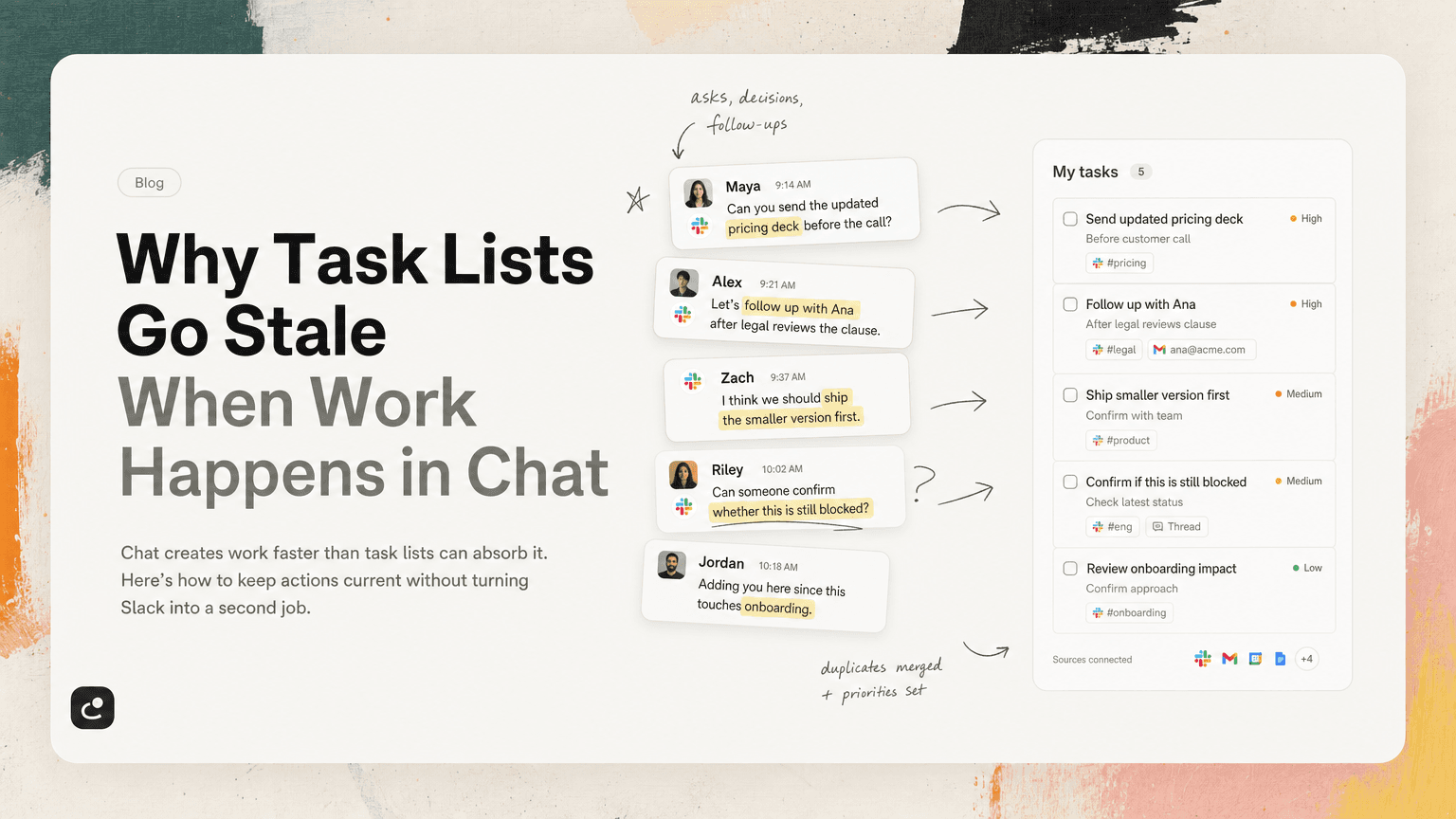
Task lists are supposed to be the stable version of your work. Chat is supposed to be the fast-moving conversation around it.
That division sounds clean until a real workday begins.
A customer question comes through Slack. A teammate drops a “can you take a look?” in a thread. Someone mentions you in a channel with a deadline implied but not stated. A meeting ends with three follow-ups, but one of them gets clarified in Gmail and another is changed in Slack an hour later.
By the end of the day, your task list is no longer a current map of your work. It is a partial memory of what you remembered to copy over.
This is why task lists go stale: not because people are disorganized, but because work now forms inside conversations before it ever becomes a task.
The task list is downstream of the real work
Most task systems assume work starts when someone creates a task.
In practice, work usually starts earlier:
- “Can you send the updated pricing deck before the call?”
- “Let’s follow up with Ana after legal reviews the clause.”
- “I think we should ship the smaller version first.”
- “Can someone confirm whether this is still blocked?”
- “Adding you here since this touches onboarding.”
These are not always formatted as tasks. They do not always include owners, dates, or clear next steps. But they often become real obligations.
The problem is that your task list only knows about the work you manually promote into it. Slack, Gmail, meetings, and shared docs contain the raw material. Your list contains the manually processed version.
That gap is where staleness begins.
Chat creates obligations in messy forms
A task list wants clean inputs:
- Title
- Owner
- Due date
- Status
- Priority
- Context
Chat rarely provides that structure.
A Slack thread might start with a bug report, drift into a product decision, then end with someone asking an engineer to verify a fix. The actual task may be the seventh message in the thread. The reason it matters may be in the third. The decision that changes the scope may be in the tenth.
For example:
“We can skip the full export for now. Can you just make sure the CSV includes account ID before the beta call?”
That is a task. It has scope, priority, and context. But unless someone captures it, it remains buried in the conversation.
Even worse, the same work may appear in multiple places:
- A Slack thread asks for the CSV update.
- A meeting note says “follow up on export requirements.”
- A Gmail reply says the beta customer needs the file by Friday.
Now your task list may have zero tasks, one vague task, or three duplicate tasks describing the same thing.
None of those outcomes is reliable.
Manual capture breaks under normal work volume
The usual advice is simple: whenever something comes up in chat, add it to your task manager.
That works for a while. It breaks when the volume of communication rises.
Manual capture requires you to do several things at once:
- Notice that a message contains work.
- Decide whether it belongs to you.
- Translate it into a clear action.
- Add it to the right system.
- Attach enough context to make it useful later.
- Update it when the conversation changes.
That is a lot to ask while you are also answering messages, preparing for meetings, reviewing work, and trying to protect focus time.
So people make reasonable tradeoffs. They star a Slack message. They mark an email unread. They tell themselves they will come back to the thread later. They add a rough task like “Follow up on beta” and hope the details are easy to reconstruct.
The list may look organized, but it is missing the live connection to what actually happened.
Stale lists create three practical problems
A stale task list is not just annoying. It changes what you work on.
1. You prioritize from incomplete information
If your list is missing the latest Slack thread, you may spend the morning on a task that was quietly deprioritized yesterday.
If your list does not include the customer follow-up sitting in Gmail, you may underestimate what needs to happen before a call.
Prioritization only works when the inputs are current. A stale list makes low-urgency work look clean and high-urgency work stay invisible.
2. You waste energy re-finding context
A task called “Update onboarding doc” is not enough.
When you finally open it, you still need to know:
- Which onboarding doc?
- What changed?
- Who asked?
- Was there a decision?
- Is this related to the customer escalation from Monday?
- Did someone already do part of it?
If the answers live in Slack, Gmail, and meeting notes, the task becomes a search project before it becomes execution.
This is one of the hidden costs of context switching. You are not just switching tools. You are rebuilding the story behind the work.
3. You lose trust in the system
Once a task list is stale often enough, people stop trusting it.
They still maintain it, but they no longer believe it is complete. So they add backup systems:
- Saved Slack messages
- Unread emails
- Personal notes
- Browser tabs
- Calendar reminders
- “Quick checks” across channels
Now the task list is one more place to check, not the place to trust.
A better system starts before the task list
The solution is not to abandon task lists. It is to stop treating them as the place where work begins.
A useful system has to account for the messy upstream flow of work. That means building habits and tooling around capture, clarification, deduplication, and review.
Capture asks close to where they happen
When an ask appears in Slack, capture it while the context is still fresh.
A good captured task should preserve:
- The requested action
- The person or team involved
- The source message or thread
- Any deadline or timing clue
- The decision or constraint that shaped the task
Bad capture:
Follow up on launch plan
Better capture:
Send Maya the revised launch timeline reflecting the decision to delay partner emails until QA signs off
The second version is longer, but it is executable. You do not have to rediscover the meaning later.
Separate “interesting” from “actionable”
Not every important message is a task.
A product decision may be context. A customer complaint may be a signal. A teammate’s FYI may influence your work without requiring a direct response.
If you turn every notable message into a task, your list becomes noisy. If you turn too few into tasks, work disappears.
Use a simple filter:
- Is there a next action?
- Is someone expecting movement?
- Is the owner clear, or does ownership need to be clarified?
- Will this become a problem if nobody tracks it?
If the answer is yes, capture it. If not, link it to the relevant work or note it as context.
Deduplicate before you prioritize
Repeated asks are common. They do not always mean separate tasks.
You might see the same underlying work show up as:
- “Can we get the onboarding copy updated?” in Slack
- “Onboarding language still says old plan names” in a meeting note
- “Please confirm pricing page terminology” in Gmail
Before prioritizing, ask whether these are separate actions or one task with multiple sources.
A clean task might be:
Update onboarding and pricing copy to use the new plan names before the sales enablement review
Then attach or reference the relevant Slack thread, meeting note, and email.
This prevents a common failure mode: doing the same mental sorting three times because the same work appeared in three different formats.
The daily review should check communication, not just tasks
Most daily planning routines start with the task list. That is useful, but incomplete.
If work happens in chat, your review needs to include the places where new work entered the system.
A practical daily review could look like this:
1. Scan yesterday’s unresolved mentions
Look for direct asks, decisions that created follow-ups, and threads where you were assigned responsibility informally.
You are not trying to reread everything. You are looking for work that did not make it into your system.
2. Check email for promised follow-ups
Search your recent sent and received mail for phrases like:
- “I’ll send”
- “I’ll follow up”
- “Can you confirm”
- “Before the meeting”
- “By Friday”
These often reveal tasks that never became tasks.
3. Review meeting notes for verbs
Meeting notes often hide work behind vague bullets.
Look for verbs:
- Send
- Draft
- Confirm
- Review
- Decide
- Schedule
- Update
- Investigate
If a note says “Discuss rollout risks,” that may be context. If it says “Confirm rollout owner with support,” that is a task.
4. Merge duplicates
Before choosing priorities, collapse repeated work into one clear item. Keep the sources attached so you can see why the task matters.
5. Pick the next few actions, not the whole universe
A current task list does not mean everything gets done today. It means you can choose with better information.
Select the work that matters now based on deadlines, dependencies, and impact. Leave the rest visible but not mentally active.
Where AI helps, and where it should stay out of the way
AI is useful here because the hard part is not making a prettier checklist. The hard part is noticing and maintaining the connection between communication and action.
An assistant can help by identifying likely tasks in Slack, Gmail, meetings, and notes; grouping duplicates; and keeping source context attached. That reduces the manual effort required to keep the list current.
This is the kind of problem CTRL is built around: work does not start in a todo app, so the system needs to read the places where work already happens and turn scattered communication into clear next actions.
The important restraint is that AI should not pretend to know your priorities better than you do. It can surface, organize, and clarify. You still decide what matters.
A simple rule for keeping lists fresh
If you want a task list that stays useful, use this rule:
A task is not complete as an entry until it includes the action, the context, and the source.
That means:
- The action tells you what to do.
- The context tells you why it matters.
- The source tells you where it came from.
Without the action, it is just a note. Without the context, it becomes hard to execute. Without the source, it becomes hard to trust.
Chat will keep moving. Threads will keep branching. Meetings will keep generating follow-ups. Email will keep producing obligations that are easy to miss.
The goal is not to slow all of that down. The goal is to make sure the work that emerges from it does not expire before it reaches the place where you plan your day.
A fresh task list is not one you polish more often. It is one that stays connected to the conversations creating the work.


Make today life changing
Move from conversation to actions in seconds
Download the ^ctrl desktop app