By Ctrl Editorial Team · May 18, 2026 · 9 min read
How to Build a Daily Brief That Is Actually Useful
A practical guide to creating a daily brief that turns scattered work into clear priorities, not another inbox to manage.
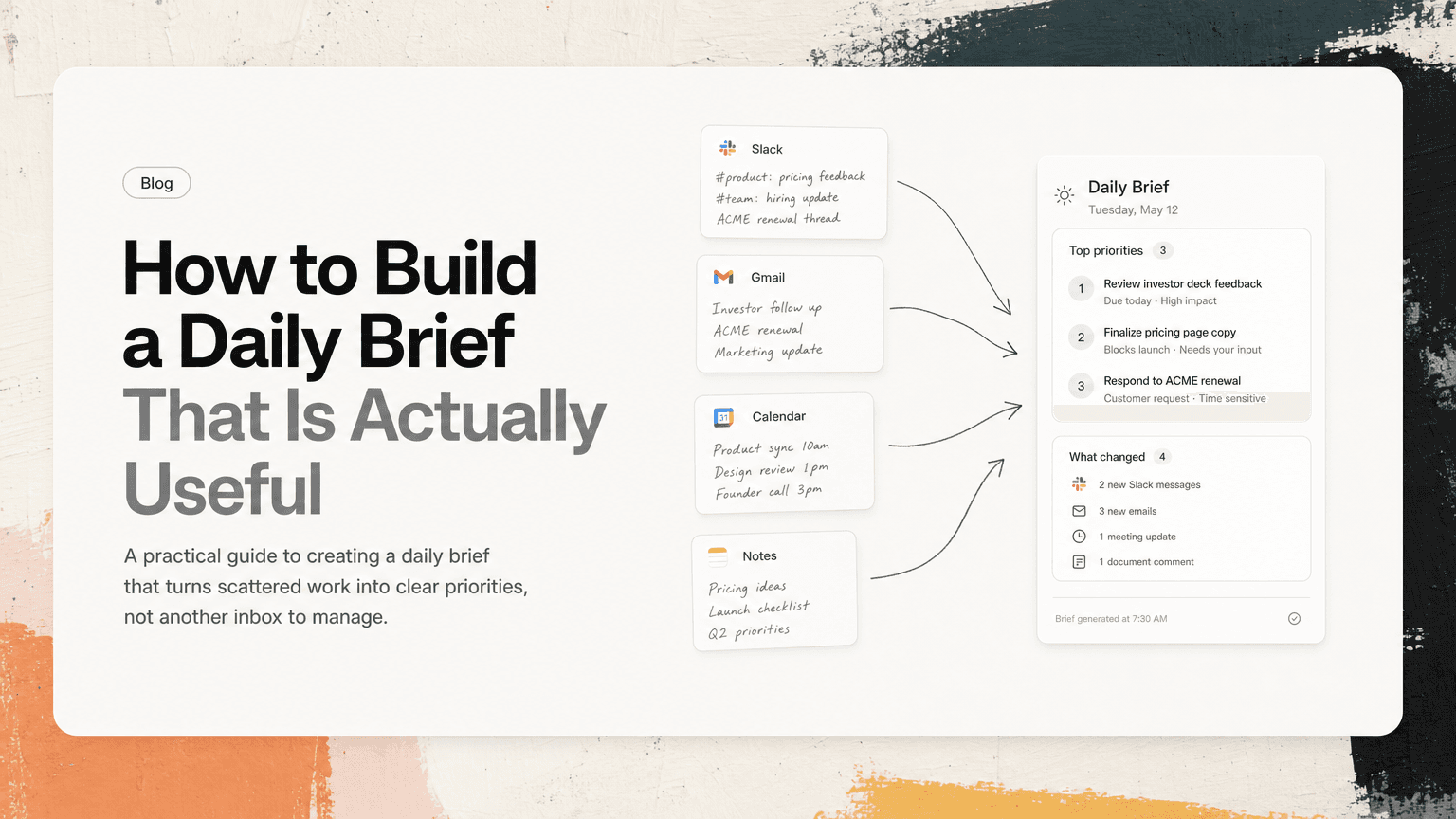
Most daily briefs fail because they try to summarize everything.
They become a prettier version of the chaos: a list of unread Slack messages, calendar events, open tasks, overdue emails, and vague reminders. You read it, feel slightly more informed, and still have to decide what matters.
A useful daily brief does something different. It helps you answer a small set of practical questions before the day starts:
- What needs my attention today?
- What changed since yesterday?
- What decisions or blockers are waiting on me?
- What should I not forget because it is buried in Slack, Gmail, or meeting notes?
- What can safely wait?
The goal is not to know everything. The goal is to start the day with enough context to make good decisions without reopening every tool.
A daily brief is not a task list
A task list tells you what exists. A daily brief tells you what matters now.
That distinction is important. Most knowledge workers already have too many places where work appears:
- A founder gets investor follow-ups in Gmail, hiring updates in Slack, and customer issues in meetings.
- A product manager gets feature requests in customer calls, roadmap questions in threads, and design feedback in docs.
- An engineer gets code review asks in Slack, incident context in meetings, and follow-up requests in email.
- An operator gets vendor updates, internal blockers, calendar-heavy coordination, and recurring process tasks.
A daily brief should not duplicate every item from every system. It should compress the day into a usable operating view.
Think of it as a decision layer, not a storage layer.
Start with the five sections that actually help
A strong daily brief does not need to be complicated. In fact, the shorter it is, the more likely you are to use it.
Use these five sections as a starting point.
1. Today’s fixed commitments
Start with what cannot move easily.
This includes meetings, deadlines, launches, customer calls, interviews, demos, or anything that changes the shape of your day.
Do not just list calendar events. Add the practical implication.
Weak version:
- 10:00 Product sync
- 1:00 Customer call
- 3:30 Hiring debrief
Useful version:
- 10:00 Product sync — need decision on whether search improvements stay in this sprint.
- 1:00 Customer call — review open onboarding blockers from last week.
- 3:30 Hiring debrief — submit feedback before end of day.
The brief should tell you why each commitment matters, not just when it happens.
2. Waiting on me
This is the section many people miss.
A lot of important work is not labeled as a task. It is phrased casually:
- “Can you take a quick look?”
- “Any concerns before I send this?”
- “Should we move forward?”
- “Can you confirm by EOD?”
- “Looping you in for approval.”
These requests often live in Slack threads, Gmail replies, meeting notes, or shared docs. They are easy to ignore because they do not look like formal tasks.
Your daily brief should surface anything where someone is blocked or waiting because of you.
For example:
- Maya is waiting on approval for the pricing page copy.
- Finance needs confirmation on the vendor renewal before Friday.
- Engineering needs a decision on whether to patch the bug or wait for the refactor.
This section is useful because it reduces hidden drag on the rest of the team. Even a quick “approved,” “not today,” or “send me the latest version” can unblock work.
3. New or changed priorities
Not every new message deserves attention. But some changes affect what you should do today.
Your brief should call out changes that alter priority, urgency, or sequencing.
Examples:
- A customer escalated an issue that was previously low priority.
- A meeting moved from tomorrow to today.
- A launch dependency slipped.
- A stakeholder changed direction in a thread you have not read yet.
- A candidate accepted another offer unless you move faster.
The key is to separate “new information” from “new information that changes the plan.”
A daily brief that includes every update becomes noise. A daily brief that highlights meaningful changes becomes useful.
4. Top priorities for focused work
This is where the brief becomes a plan.
Pick the small number of outcomes that would make the day successful. Usually that means one to three priorities, not twelve.
Good priorities are specific and finishable:
- Finalize the launch checklist and assign owners.
- Review the onboarding flow notes and decide what ships this week.
- Send the enterprise renewal response with legal’s edits included.
- Draft the incident follow-up and share it with the engineering leads.
Weak priorities are vague:
- Work on launch.
- Catch up on email.
- Think about roadmap.
- Handle customer stuff.
If your daily brief gives you vague priorities, you still have to do the planning work. Rewrite them as outcomes.
A simple test: if you saw the item at 4:30 p.m., would you know exactly what “done” looks like? If not, sharpen it.
5. Context worth keeping close
A useful brief should preserve the context attached to the work.
This does not mean pasting entire Slack threads or meeting transcripts into your morning plan. It means keeping the key details that prevent unnecessary app switching.
For example:
- “Customer prefers SSO before rollout; concern came up in Tuesday’s onboarding call.”
- “Decision from product sync: keep export feature out of v1 unless sales has a committed deal.”
- “Legal approved the clause change, but finance still needs to review payment terms.”
- “Bug affects workspace admins only; support has two examples in Gmail.”
This kind of context keeps you from opening Slack, then Gmail, then Calendar, then notes, just to reconstruct why a task exists.
What to leave out of your daily brief
A daily brief gets worse as it gets longer. The hard part is not deciding what to include. It is deciding what to exclude.
Leave out these items by default.
Every unread message
Unread does not mean important. If your brief is just a digest of everything you missed, it becomes another inbox.
Include unread messages only when they contain an action, decision, blocker, deadline, or meaningful change.
Old tasks with no movement
A task that has been sitting around for two weeks may matter, but it does not automatically belong in today’s brief.
Include it only if it is newly relevant today, blocking someone, tied to a deadline, or one of your chosen priorities.
Duplicate requests
The same work often appears in multiple places.
A teammate mentions it in Slack. A manager repeats it in a meeting. Someone forwards an email. The task gets written in notes. Suddenly it looks like four tasks when it is really one.
Your daily brief should collapse duplicates into one clear item, ideally with the relevant sources attached or referenced.
Instead of:
- Follow up on ACME onboarding.
- Reply to Jenna about ACME.
- Check notes from ACME call.
- Review onboarding issue from Slack.
Use:
- Resolve ACME onboarding blocker: confirm SSO timeline and reply to Jenna. Context in customer call notes and Slack thread.
Nice-to-know updates
Some updates are useful but not actionable today.
A good brief can ignore them. You can still find them later if needed. The point of the brief is to protect attention, not prove that you saw everything.
A simple daily brief template
Here is a practical template you can use tomorrow.
## Daily brief — [Date]

### Fixed commitments
- [Meeting/deadline] — [why it matters or what needs to be decided]

### Waiting on me
- [Person/team] needs [decision/review/reply] by [time if relevant]

### Changed since yesterday
- [Change] → [impact on today’s plan]

### Top priorities
1. [Specific outcome]
2. [Specific outcome]
3. [Specific outcome]

### Context to keep close
- [Decision, constraint, customer detail, or dependency]

### Can wait
- [Item intentionally deferred]
The “Can wait” section is underrated. It gives you permission not to carry everything in your head.
For example:
- Can wait: internal wiki cleanup, Q3 planning notes, competitor review, non-urgent vendor comparison.
This is not procrastination. It is prioritization with a parking lot.
Build the brief from where work actually happens
The hardest part of creating a daily brief is that the inputs are scattered.
Your calendar shows commitments. Gmail shows external follow-ups. Slack shows fast-moving requests and decisions. Meeting notes contain action items. Task tools show planned work. None of them has the whole picture.
If you build the brief manually, use a short morning routine:
- Check your calendar for the shape of the day.
- Scan Slack for direct mentions, threads you participated in, and decision-heavy channels.
- Scan Gmail for replies that require action or contain deadlines.
- Review yesterday’s meetings for decisions and assigned follow-ups.
- Open your task list and choose what actually fits today.
- Deduplicate repeated items before writing the final version.
Do not spend 45 minutes making the brief beautiful. Ten focused minutes is better than a perfect plan you abandon by 11 a.m.
This is also where an intelligent work assistant can help. CTRL connects to tools like Slack, Gmail, Google Calendar, meetings, and shared notes so scattered requests can become clearer next actions with context attached. The point is not to replace your judgment. It is to reduce the amount of digging required before you can use it.
Review the brief at three moments
A daily brief is not only for the morning. Use it lightly throughout the day.
Morning: choose the plan
Read the brief before opening Slack or Gmail in full. Decide your top priorities while your attention is still clean.
Ask:
- What must happen today?
- Who is waiting on me?
- What would make the day successful?
Midday: adjust with intent
By lunch, something has probably changed. A meeting ran long. A customer escalated. A teammate needed a decision.
Do a two-minute reset:
- Is the top priority still the top priority?
- Did anything new become urgent?
- What should move to “Can wait”?
The value is not sticking rigidly to the morning plan. The value is changing the plan consciously.
End of day: close loops
Before you stop working, use the brief to close open loops.
- Send the reply someone is waiting on.
- Move unfinished work forward with a clear next step.
- Capture decisions from late meetings.
- Note what should appear in tomorrow’s brief.
This prevents the same half-remembered tasks from haunting the next morning.
The real test: does it reduce context switching?
A daily brief is useful if it reduces the number of times you have to ask, “Where was that again?”
It should help you avoid bouncing between:
- Slack for the original request
- Gmail for the customer detail
- Calendar for the meeting date
- Notes for the decision
- A task manager for the next step
The brief does not need to contain everything. It needs to contain enough to help you act.
If your brief makes you calmer, sharper, and faster to start, it is working. If it feels like another feed to process, cut it down.
The best daily brief is not a summary of your work. It is a short, reliable bridge between scattered information and the next right action.


Make today life changing
Move from conversation to actions in seconds
Download the ^ctrl desktop app