By Ctrl Editorial Team · May 30, 2026 · 9 min read
How to Keep Decisions Connected to the Work They Change
A practical system for making sure decisions from Slack, email, and meetings stay attached to the tasks they affect.
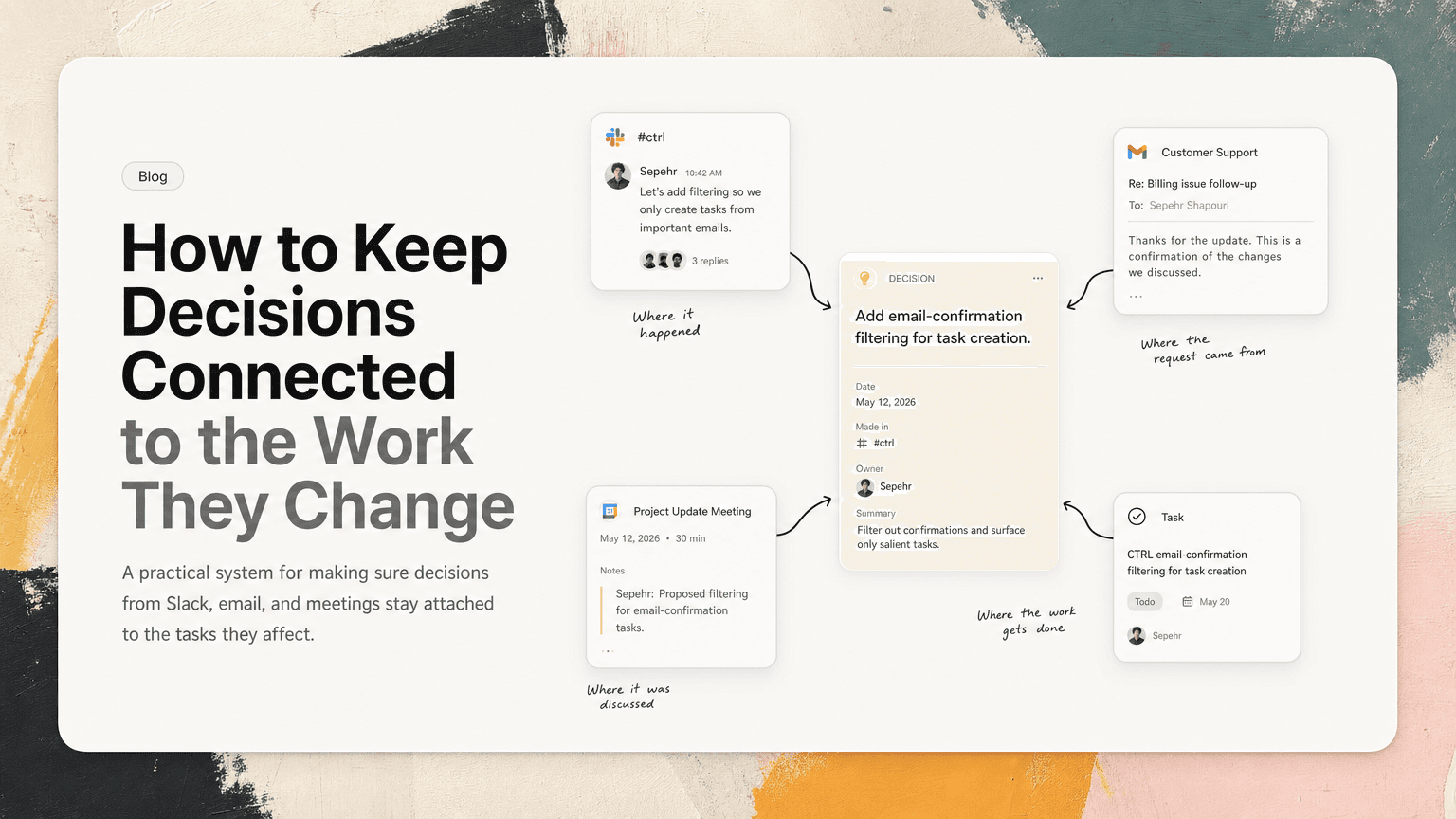
Decisions are not useful because they were made. They are useful when they change what people do next.
That is where many teams lose time. A decision happens in a Slack thread, a customer call, a planning meeting, or a reply-all email. Everyone understands it in the moment. Then the work moves somewhere else: a task list, a roadmap doc, a sprint board, a calendar invite, or someone’s memory.
A week later, the task still exists, but the decision that changed it is missing.
Someone asks, “Why are we doing it this way?”
Another person says, “I think we decided that in the thread with design.”
Then the search begins.
The fix is not to write longer notes. It is to keep decisions attached to the work they affect.
The problem: decisions and execution live in different places
Most modern work is split across tools:
- Slack for quick alignment and debate
- Gmail for customer, partner, and stakeholder communication
- Meetings for decisions that need discussion
- Docs for planning and synthesis
- Task managers for execution
- Calendars for commitments and deadlines
Each tool makes sense on its own. The problem is the handoff between them.
A decision might start as a sentence in Slack:
Let’s ship the admin export without filtering for v1. We can add filters after launch.
That sentence changes the work. It affects scope, QA, support messaging, and maybe the launch checklist. But if the related task only says “Build admin export,” the person doing the work has to reconstruct the decision later.
The decision was clear. The task is vague.
This is how teams create accidental rework. Not because people are careless, but because the reasoning behind work gets separated from the work itself.
A decision is not the same as a note
Teams often try to solve this by improving note-taking. Better meeting notes. Cleaner docs. More detailed summaries.
Those help, but only up to a point.
A note is a record of what happened. A decision is an instruction that changes future work.
If a decision stays only in notes, people still have to:
- Remember that the decision exists
- Find the note
- Interpret what task it affects
- Apply it correctly
That is too much friction for busy teams.
A useful decision record should answer four practical questions:
- What did we decide?
- What work does it change?
- Who needs to act on it?
- Where did the decision come from?
If any of those are missing, the decision is likely to drift away from execution.
The decision-to-work rule
Use this rule:
Every decision that changes work should be attached to at least one next action.
Not every comment needs this treatment. Not every opinion deserves a task. But when a decision changes scope, priority, ownership, timing, or requirements, it should not sit alone in Slack or a meeting note.
It should become part of the work system.
For example:
Slack decision
Decision in Slack:
We’re going to remove the CSV import from this release. Too many edge cases.
Attached next actions:
- Update launch scope to remove CSV import
- Tell customer-facing teams CSV import is no longer in v1
- Remove CSV import from QA checklist
Context to keep attached:
- Link to the Slack thread
- Who made the call
- Any constraint that mattered, such as edge cases or launch timing
Meeting decision
Decision in a product review:
We’ll keep the onboarding checklist visible until users complete three key actions.
Attached next actions:
- Update onboarding spec with completion logic
- Add tracking for the three required actions
- Confirm copy for the persistent checklist state
Context to keep attached:
- Link to meeting notes or transcript
- The exact completion criteria
- Any tradeoff discussed, such as persistence versus visual clutter
Email decision
Decision in Gmail from a customer or stakeholder:
We can move forward if the first version supports SSO for admins only.
Attached next actions:
- Update enterprise requirements to specify admin-only SSO
- Confirm implementation plan with engineering
- Reply with the agreed scope and timeline
Context to keep attached:
- Link to the email
- Who approved the reduced scope
- The wording of the condition
This is the difference between “we discussed it” and “the work changed.”
Capture the decision in plain language
A decision should be written so someone can understand it later without reading the entire conversation first.
Bad:
Follow up from Slack thread.
Better:
Decision: ship admin export in v1 without filters; add filtering after launch.
Best:
Decision: ship admin export in v1 without filters because filtering adds edge cases that could delay launch. Follow-up task: update scope, QA checklist, and support notes.
The best version is still short. It does not try to summarize the whole debate. It captures the conclusion and the reason.
Use a simple format:
Decision: [what changed] because [reason]. Next action: [what needs to happen now]. Source: [where it was decided].
This format works because it keeps the decision operational. It does not become a historical artifact.
Attach decisions at the moment of transition
The best time to attach a decision is when work moves from conversation into execution.
There are a few common transition points.
After a meeting
Do not end meeting notes with a general “Decisions” section and hope people revisit it.
Instead, review the decisions and immediately connect them to tasks.
Ask:
- Which tasks changed because of this meeting?
- Are any existing tasks now wrong or outdated?
- Did we create new work?
- Did we remove work?
- Does anyone need to communicate the decision elsewhere?
A five-minute pass at the end of a meeting can prevent days of confusion later.
When a Slack thread resolves
Slack threads often contain the actual decision, especially for product, engineering, and operations teams.
When the thread reaches a conclusion, do not let the final message be the only record.
Turn the conclusion into a task update or a new next action. Include the link back to the thread.
Example:
Decision: keep the beta invite flow manual this week so support can review edge cases. Next action: update launch checklist and tell the support team what to expect. Source: Slack thread.
The source link matters because Slack conversations contain nuance: objections, constraints, alternatives, and names of people involved.
When an email changes scope
Emails often contain commitments that never make it into the work plan.
Watch for phrases like:
- “We can move forward if…”
- “Let’s not include…”
- “The priority is now…”
- “Can we instead…”
- “Approved, assuming…”
Those are decision signals.
If an email changes the work, do not leave it in the inbox. Create or update the relevant task and keep the email linked as the source.
Keep the old decision visible when the decision changes
Some decisions are not final. They evolve.
The mistake is replacing the old decision without preserving the reason for the change. That creates confusion for anyone who was operating from the earlier version.
Use a short decision history when the change matters:
Previous decision: launch without filters to protect timeline.
Updated decision: include basic date filtering because two launch customers require it.
Current next action: update scope and estimate date filtering only, not advanced filters.
This prevents a common failure mode: people argue about the old decision because they never saw the new one.
It also helps teams understand why the work changed without reopening the entire debate.
Separate decisions from preferences
Not every comment is a decision.
If everything becomes a decision record, the system becomes noisy and people stop trusting it.
A decision should meet at least one of these conditions:
- It changes what someone will do
- It changes the priority of existing work
- It removes or adds scope
- It assigns ownership
- It creates a commitment to a customer, partner, or internal team
- It changes timing or sequencing
A preference is different:
I like the shorter version of the headline.
That may matter, but it is not necessarily a decision until someone says:
Use the shorter headline for launch.
The second sentence changes work. Capture that.
Review decisions during prioritization
Daily and weekly prioritization should not only ask, “What tasks are due?”
It should also ask, “Which decisions changed the shape of the work?”
Before starting the day, scan for recent decisions from:
- Yesterday’s meetings
- Important Slack threads
- Customer emails
- Project docs that were updated
- Tasks with changed scope or owners
Then update priorities accordingly.
For example, your task list may say:
- Draft onboarding copy
- Review support macros
- Prepare launch checklist
But yesterday’s meeting decided that the onboarding checklist will stay visible until three actions are complete. That decision changes the copy, the support macros, and the launch checklist.
Without that context, you may technically complete the tasks while solving the wrong version of the problem.
Use source links to reduce context switching
When a task includes only a summary, people still end up switching tools to verify details.
A source-linked task reduces that friction.
Instead of:
Update onboarding checklist logic.
Use:
Update onboarding checklist logic so it stays visible until users complete three required actions. Source: product review notes.
Now the task carries enough context to start, and the source is available if deeper detail is needed.
This is where an intelligent work assistant can help. CTRL connects to tools like Slack, Gmail, Google Calendar, meetings, and shared notes so decisions and action items can be captured from the places where they already happen, then connected to clearer next actions. The point is not to create another place to manage work. It is to keep the relevant context attached when work moves across tools.
A lightweight checklist for decision hygiene
Use this checklist when a decision is made:
State the decision clearly
What exactly changed?Name the affected work
Which task, project, customer, launch, or owner does this impact?Create or update next actions
What must happen because of the decision?Keep the source attached
Where did the decision happen: Slack, email, meeting, doc?Preserve the reason
Why did the team choose this path?Remove outdated work
Did the decision make any task irrelevant or incorrect?Tell the people affected
Who might still be working from old context?
This does not need to be heavy. Most decisions can be captured in two or three lines. The important part is connecting them to execution.
The goal is less reconstruction
Teams lose time when they have to reconstruct why work exists.
They search Slack. They reread emails. They ask people to repeat old reasoning. They reopen decisions because the original context is missing.
Keeping decisions attached to the work they change reduces that reconstruction. It makes tasks easier to trust. It makes prioritization more accurate. It helps people move without constantly asking, “Wait, why are we doing this?”
A good system does not require every person to remember every conversation. It makes the decision visible at the moment the work needs it.
That is the practical standard: if a decision changes the work, the work should carry the decision with it.


Make today life changing
Move from conversation to actions in seconds
Download the ^ctrl desktop app