By Ctrl Editorial Team · May 27, 2026 · 10 min read
Slack Shows the Work. Task Managers Show the Commitment.
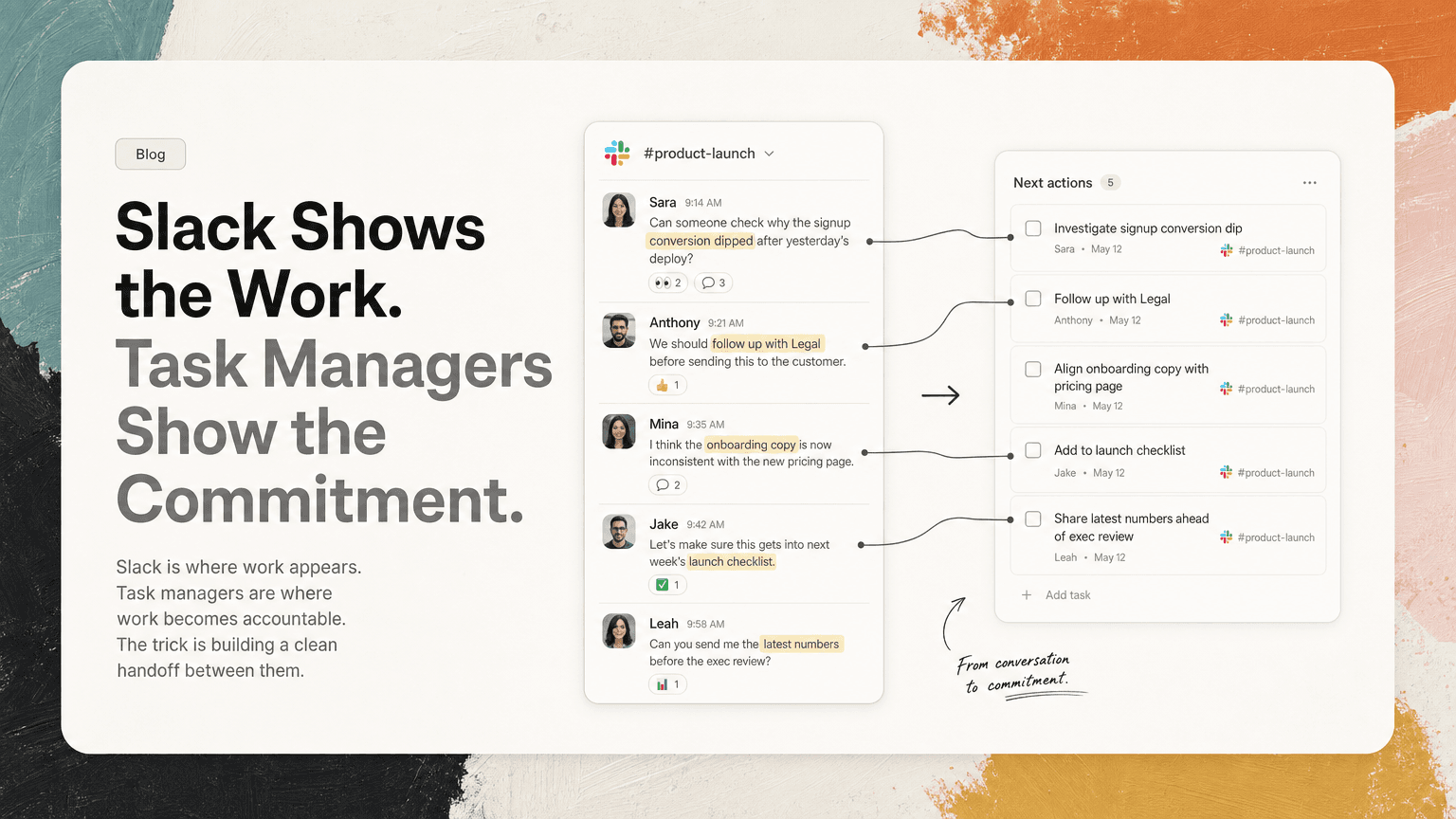
Slack is where work appears. Task managers are where work becomes accountable. The trick is building a clean handoff between them.
Slack and task managers are often treated like competitors.
One is fast, conversational, and messy. The other is structured, deliberate, and easier to review. Teams argue about where work should live, then end up using both badly: Slack becomes a running task list, and the task manager becomes a museum of stale intentions.
The better question is not “Slack or task manager?”
It is: what kind of work belongs in each place, and how does work move cleanly between them?
Slack is where work appears. Task managers are where work becomes a commitment. If you blur that line, important work gets buried in threads, duplicated across tools, or stripped of the context needed to do it well.
Slack is where work actually shows up
A lot of meaningful work does not begin as a neatly written task.
It starts like this:
- “Can someone check why the signup conversion dipped after yesterday’s deploy?”
- “We should follow up with Legal before sending this to the customer.”
- “I think the onboarding copy is now inconsistent with the new pricing page.”
- “Let’s make sure this gets into next week’s launch checklist.”
- “Can you send me the latest numbers before the exec review?”
None of these messages arrive wearing a task-shaped uniform. Some are questions. Some are decisions. Some are implied follow-ups. Some are requests hidden inside a thread that has already wandered through three topics.
That is why Slack is so dangerous as a place for execution. It contains a lot of the real work, but it does not naturally preserve work in a way that supports accountability.
Slack is optimized for flow:
- quick replies
- lightweight decisions
- side conversations
- rapid escalation
- informal collaboration
Task managers are optimized for commitment:
- ownership
- due dates
- prioritization
- status
- review
- sequencing
A Slack message can reveal work. It usually should not be the final home for that work.
The failure mode: treating Slack like a task manager
Using Slack as your task manager feels efficient at first because nothing has to move. You star a message, save a post, leave something unread, or tell yourself you will come back to it later.
That system breaks quickly.
Saved messages become a private junk drawer
Saving a Slack message is useful for “I want to look at this again.” It is not enough for “this is now a commitment.”
A saved message usually lacks:
- a clear owner
- a specific next action
- a due date or urgency level
- a connection to related work
- a place in your priority stack
It also mixes everything together: links to read, decisions to remember, tasks to do, messages to reply to, and things you saved because you were interrupted.
Threads hide the actual decision
Slack threads are great for keeping a channel readable. They are also excellent places for work to disappear.
A thread might begin with a customer question, move into a product discussion, include an engineer’s technical note, and end with a decision like, “Okay, let’s ship the safer version and revisit the edge case later.”
What is the task?
Maybe it is:
- update the implementation plan
- notify the customer-facing team
- change the launch note
- create a follow-up ticket for the edge case
- confirm who owns the safer version
If nobody extracts the action, the team may remember the discussion but still fail to execute the decision.
Mentions create false confidence
A mention feels like assignment. It often is not.
“@Maya can you take a look?” is not the same as “Maya owns reviewing the billing flow by Thursday and posting a recommendation in #launch.”
The difference matters. Mentions are conversational. Tasks are operational.
If your team relies on mentions as the source of truth, you are asking everyone to maintain a mental task manager based on pings, memory, and unread badges.
The opposite failure mode: forcing every conversation into a task manager
The answer is not to turn every Slack message into a ticket.
That creates its own problem: too much structure too early.
Some conversations need discussion before they become work. Some questions are resolved in two messages. Some ideas should be captured as context but not turned into tasks. Some decisions affect existing tasks rather than creating new ones.
If your task manager becomes a dumping ground for every half-formed Slack message, the team stops trusting it. People see too many vague tasks like:
- “Follow up on pricing thread”
- “Look into onboarding issue”
- “Review customer concern”
- “Circle back on launch question”
These are not useful tasks. They are bookmarks disguised as work.
A good task is not just a copied message. It is a clarified commitment.
A practical split: signal, commitment, context
The cleanest system is to separate three things that often get mixed together.
1. Signal lives in Slack
Signal is the raw material: requests, decisions, blockers, ideas, concerns, and updates.
Slack is good for signal because it is where people are already talking. Do not fight that. You want work signals to be easy to raise.
Examples:
- A sales lead mentions that a prospect needs a security answer before Friday.
- An engineer flags that a dependency may slip.
- A founder asks for the latest cash forecast before a board prep meeting.
- A product manager decides in a thread to cut a feature from the release.
These signals should not require perfect formatting. If the cost of raising work is too high, people will stop raising it.
2. Commitment lives in the task system
Once a signal becomes something someone must do, it needs a better home.
A real commitment should answer:
- What is the next action?
- Who owns it?
- When does it matter?
- What is the priority relative to other work?
- What context does the owner need?
Compare these two versions:
Weak task:
Follow up on Acme security question.
Better task:
Send Acme the updated SOC 2 answer by Thursday, using Priya’s note from the #security thread. Confirm with Sales before sending.
The better task includes the action, the recipient, the deadline, the source context, and the collaboration needed.
3. Context should stay attached
The biggest problem with moving work out of Slack is context loss.
A copied task often loses the “why” behind the work:
- who asked for it
- what decision led to it
- what constraints were discussed
- what alternatives were rejected
- what urgency was implied
That missing context creates more messages later. The owner has to ask, “Where did this come from?” or “What did we decide?” or “Is this still urgent?”
A strong handoff preserves a link back to the original Slack thread, email, meeting note, or decision. The task should not contain every detail, but it should make the source easy to inspect.
How to move work from Slack to tasks without creating overhead
You do not need a heavy process. You need a few rules your team can remember.
Rule 1: Convert only when there is a next action
Not every Slack message deserves a task. Convert when there is an action that someone is expected to complete.
Good candidates:
- “Can you send this to Finance by EOD?”
- “Let’s update the launch checklist with the rollback plan.”
- “We need to respond to the customer before the renewal call.”
- “Please confirm whether this bug affects the mobile app too.”
Poor candidates:
- “Interesting idea.”
- “We might want to revisit this.”
- “Good thread.”
- “Something to think about.”
Those may be notes, references, or backlog ideas. They are not necessarily tasks.
Rule 2: Rewrite the message as an action
Do not paste Slack messages verbatim unless the wording is already clear.
Turn:
“We should probably make sure Support knows about the API change.”
Into:
Brief Support on the API change before release notes go out.
Turn:
“Can someone check whether the Gmail sync issue is the same bug as last week?”
Into:
Compare the current Gmail sync issue with last week’s bug and post whether they share the same root cause.
The rewrite is where ambiguity gets removed.
Rule 3: Add the source, not a novel
The task should be short enough to scan, but connected enough to investigate.
A useful task includes:
- one clear action
- owner if known
- due date if real
- relevant source link
- short note on why it matters
For example:
Update onboarding checklist to include the new Gmail permission step. Source: #activation thread. Needed before next week’s customer onboarding calls.
That is enough to act without reopening the whole conversation immediately, and enough to recover the context if needed.
Rule 4: Deduplicate repeated asks
Slack often creates repeated work signals.
The same issue might appear in:
- a channel message
- a thread reply
- a DM
- a meeting note
- a follow-up email
If each one becomes a separate task, your system gets noisy. Before creating a new task, check whether it updates an existing one.
Example: a customer follow-up appears in Gmail, then a sales channel, then a meeting recap. That should usually become one task with multiple pieces of context, not three separate reminders.
This is one place where an intelligent work assistant like CTRL can help: it connects to tools such as Slack, Gmail, Calendar, meetings, and notes, so scattered signals can be turned into clearer next actions without relying entirely on manual copying.
What this looks like in a normal day
Imagine a product manager starts the morning with three inputs:
- A Slack thread about a confusing signup metric
- A Gmail from a customer asking for clarification before renewal
- A calendar full of meetings, including launch review
A weak system leaves these as separate inboxes. The PM checks Slack, opens Gmail, scans meeting notes, switches back to Slack, saves a few messages, and hopes nothing slips.
A stronger system produces a short execution list:
- Confirm whether the signup metric changed because of tracking or actual user behavior.
- Send the renewal clarification to the customer after checking the latest pricing language.
- Add the rollback owner to the launch review agenda.
- Follow up with Engineering on the mobile edge case from yesterday’s thread.
Each task links back to where it came from. The PM can prioritize the work without holding every conversation in memory.
That is the goal: not more tasks, but fewer loose ends.
The team habit that matters most
The most important habit is agreeing that Slack is not the final source of accountability.
A simple team norm can work:
If a Slack conversation creates a real commitment, it must become a clear next action somewhere reviewable.
That does not mean every team needs the same task manager or workflow. Engineering may use tickets. Operators may use a shared task list. Founders may work from a daily priority brief. Customer-facing teams may track follow-ups by account.
The format can vary. The principle should not.
Work can start in Slack. It should not depend on Slack archaeology to get done.
The real answer to Slack vs task managers
Slack is better for discovery. Task managers are better for execution.
Slack helps teams notice work quickly. Task systems help teams decide what actually gets done, by whom, and when. The handoff between them is where most productivity systems either work or fail.
If you leave work in Slack, it gets buried. If you move it into a task manager without context, it gets vague. If you move everything, the task manager gets bloated.
The practical middle path is simple:
- let Slack capture the signal
- convert only real commitments
- rewrite them as clear next actions
- attach the source context
- deduplicate repeated asks
- review priorities from one place
CTRL is built around that handoff: reading the places where work already happens and helping turn scattered communication into source-linked next actions. But the underlying discipline matters with or without any tool.
The point is not to make Slack quieter or task managers busier.
The point is to make the work visible, committed, and possible to finish.


Make today life changing
Move from conversation to actions in seconds
Download the ^ctrl desktop app