By Ctrl Editorial Team · June 1, 2026 · 9 min read
The Daily Brief Is Broken. Here’s How to Make It Useful.
A practical system for building a daily brief that turns scattered updates into priorities, decisions, and next actions.
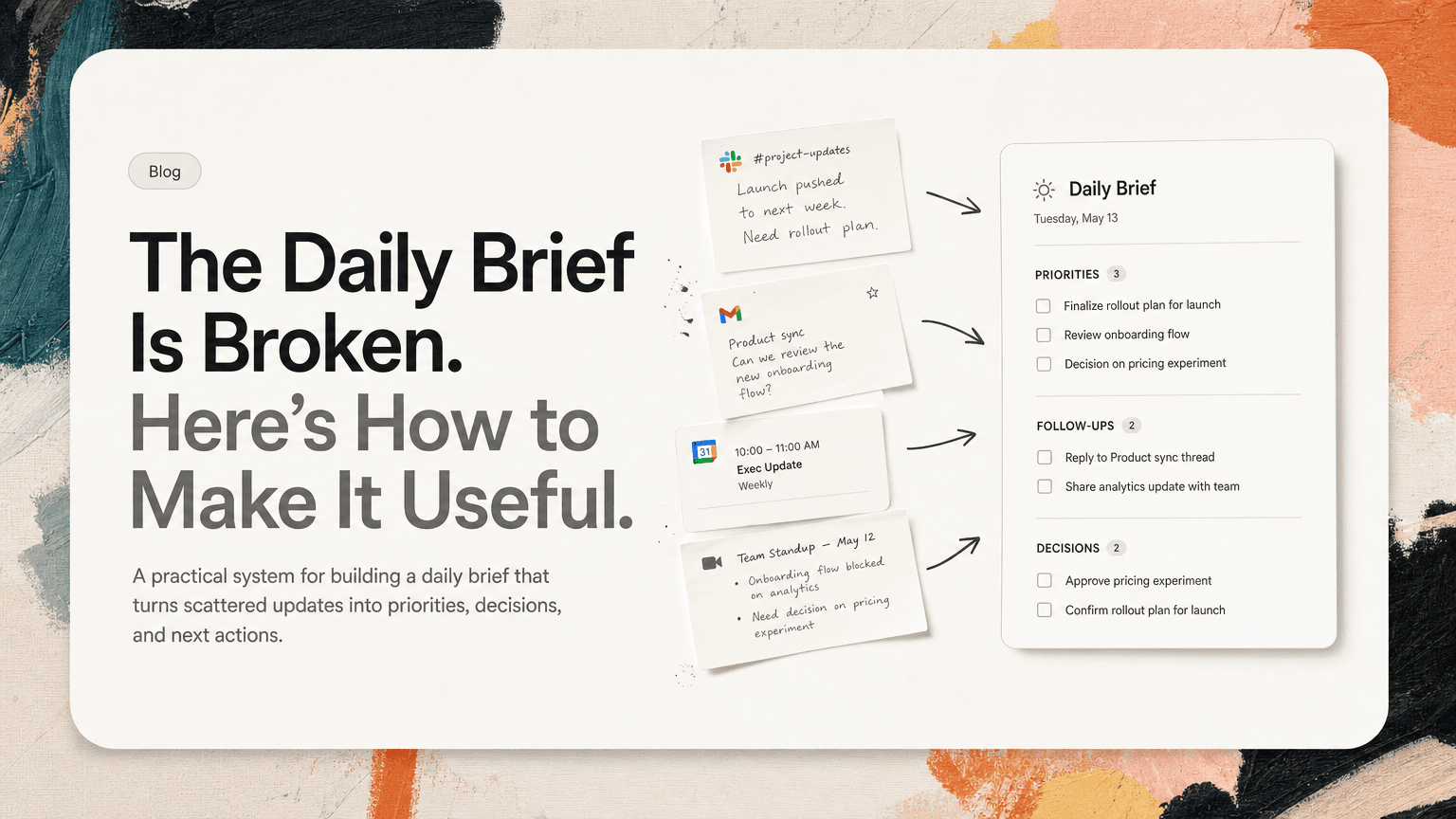
Most daily briefs are too polite to be useful.
They summarize your calendar, list a few headlines, and maybe remind you that you have unread messages. That is not a brief. That is a prettier version of the noise you were already going to open.
A useful daily brief should help you answer three questions before the day starts:
- What actually matters today?
- What did I commit to, explicitly or implicitly?
- What context do I need so I do not waste the first hour reconstructing yesterday?
If your brief does not change what you do next, it is just another inbox.
The goal is not to create a perfect morning document. The goal is to reduce the number of times you have to jump between Slack, Gmail, calendar, meeting notes, and your task list just to understand your own day.
Start with the job of the brief
A daily brief should not be a diary. It should not be a complete archive of everything that happened. It should not be a feed.
Its job is to turn scattered work into a short operating plan.
That means the brief needs to contain fewer updates and more decisions:
- What needs attention now?
- What can wait?
- What needs a reply?
- What needs a decision?
- What has become a task?
- What context explains why the task matters?
A good daily brief is selective. It is allowed to ignore things.
For example, “You have 42 unread Slack messages” is not useful. “Dana asked for approval on the onboarding copy before the 2pm launch review” is useful.
“Three emails from vendors arrived overnight” is not useful. “The security questionnaire is blocking procurement, and Legal asked for your review by Friday” is useful.
The difference is actionability.
Use a five-part structure
The simplest useful daily brief has five sections:
- Today’s hard commitments
- Open loops from yesterday
- New asks from Slack and email
- Decisions and context
- A short priority list
This structure works because it separates time-bound work from communication-driven work. Your calendar tells one story. Your messages tell another. Your notes tell a third. The brief should reconcile them.
1. Today’s hard commitments
Start with the things that have a fixed time or deadline.
Include:
- Meetings that require preparation
- Deadlines due today
- Time-sensitive customer or stakeholder follow-ups
- Reviews, launches, interviews, or handoffs that cannot slide
Do not include every calendar event with equal weight. A daily standup and a board prep session should not receive the same treatment.
A useful version looks like this:
- 10:00am — Product review: Need final decision on whether search filters ship this sprint.
- 1:30pm — Customer call: Bring latest notes from support thread and open contract question.
- 4:00pm — Launch check: Confirm owner for help center update before signoff.
This gives you more than a schedule. It tells you where your attention will be needed.
2. Open loops from yesterday
Most dropped work is not forgotten because it was unimportant. It is forgotten because it was not captured at the moment it appeared.
Open loops usually hide in places like:
- “Can you take a look?” messages in Slack
- A follow-up promised during a meeting
- A customer email that required internal input
- A decision made in notes but not translated into ownership
- A task mentioned in a thread, then buried by later replies
Your brief should pull these forward.
For example:
- You said you would send Priya the revised rollout plan after yesterday’s planning meeting.
- Marcus asked in Slack whether the billing bug should block the release.
- The customer success team is waiting on product guidance for the enterprise onboarding question.
This section is not about guilt. It is about visibility. If something still matters, it should be in front of you before the day fills up.
3. New asks from Slack and email
The most useful daily brief is ruthless about distinguishing messages from asks.
A message is information. An ask requires action.
Bad brief:
- 18 unread messages in #sales
- 6 new emails from Alex
- Activity in the launch thread
Useful brief:
- Alex asked for approval on the revised pricing language.
- Sales needs confirmation on whether the implementation timeline changed.
- Launch thread has one unresolved owner: who is sending the customer announcement?
When reviewing Slack and Gmail, look for phrases like:
- “Can you…”
- “Do you know…”
- “Who owns…”
- “Following up…”
- “Just checking…”
- “Before we move forward…”
- “Need your input…”
These are often tasks disguised as conversation.
The brief should also deduplicate repeated asks. If the same action appears in Slack, then again in email, then again in meeting notes, it should not show up as three tasks. It should show up once, with the relevant context attached.
For example:
- Review security questionnaire — requested by Procurement in email, mentioned again by Sales in Slack, due before customer legal review.
That is much better than seeing three disconnected reminders and wondering whether they are the same thing.
4. Decisions and context
This is the section most daily briefs miss.
Tasks without context become stale quickly. A line like “Update onboarding copy” is not enough. Update it how? Because of which decision? For which launch? Based on what feedback?
Your brief should preserve the reason behind the work.
Instead of:
- Update onboarding copy
Use:
- Update onboarding copy to reflect the decision from yesterday’s product review: remove the setup checklist from the first-run flow and move it to the help center article.
Instead of:
- Follow up with customer
Use:
- Follow up with Acme about SSO timing. They are blocked on internal IT approval and asked whether the rollout can start with a smaller pilot group.
This prevents the morning archaeology problem: opening a task, then searching Slack, then checking Gmail, then scanning notes, then asking someone to remind you what happened.
The best brief keeps the “why” close to the “what.”
End with a short priority list
A daily brief should not end with 27 items. If it does, it has failed to prioritize.
End with a short list of what should happen first.
A practical format:
Top priorities
- Prepare for the product review decision on search filters.
- Reply to Procurement with the security questionnaire answers.
- Confirm launch announcement owner before the 4pm check.
If there is time
- Review draft onboarding copy.
- Clean up the backlog notes from yesterday’s customer feedback meeting.
- Respond to lower-priority vendor email.
This distinction matters. Most people do not need a longer task list. They need a clearer first move.
You can also label priorities by risk:
- Blocks others: Security questionnaire, launch owner, design approval
- Time-sensitive: Customer reply, meeting prep, deadline review
- Deep work: Spec draft, analysis, strategy doc
- Can wait: Nice-to-have cleanup, FYI responses, low-stakes admin
The point is to make tradeoffs visible. If everything is presented equally, your attention will default to the loudest channel.
Build the brief from real work sources
A useful daily brief cannot be built only from your task manager. By the time work reaches a task manager, it has already survived a capture process. A lot of important work never gets that far.
The brief should draw from the places where work begins:
- Slack threads where people ask for help, approval, or ownership
- Gmail conversations with customers, vendors, candidates, or internal teams
- Calendar events that imply preparation or follow-up
- Meeting notes where decisions are made but not assigned
- Existing tasks that are due, blocked, or newly relevant
This is where AI can help, as long as it is used for extraction and organization rather than vague summarization.
For example, CTRL connects to the tools where work already happens and helps turn scattered messages, emails, meetings, and notes into clear next actions. The practical value is not that it writes a nicer summary. It is that the brief can be grounded in the actual sources of work instead of relying on memory.
Whether you use software or a manual process, the standard is the same: the brief should surface commitments, not just content.
A manual version you can try tomorrow
If you want to build a better daily brief without changing tools, use this 15-minute routine.
Minute 1–3: Scan your calendar
Write down only the meetings that need preparation, decisions, or follow-up.
Ask:
- What do I need to know before this meeting?
- What decision might be required?
- Who is depending on me?
Minute 4–7: Search for open asks
Check Slack mentions, direct messages, and important project channels. Then check email.
Look for actual asks, not general activity.
Capture them in one sentence each:
- Person + request + deadline/context
Example:
- Jamie needs confirmation today on whether the migration email can go out before the help doc is updated.
Minute 8–10: Review yesterday’s notes
Look for decisions, owners, and unresolved questions.
Convert vague notes into next actions:
- “Discussed pricing page” becomes “Send final pricing page comments to Mia before design review.”
- “Need legal input” becomes “Ask Legal whether the updated terms affect the enterprise pilot.”
Minute 11–13: Deduplicate and attach context
Combine repeated items.
If Slack says “Can you review the questionnaire?” and email says “Following up on the security answers,” make one task:
- Review security questionnaire for Acme procurement; Sales is waiting to unblock legal review.
Add the source or context so you do not have to search later.
Minute 14–15: Pick the first three moves
Choose the three actions that reduce the most risk or unblock the most people.
Do not optimize for what is easiest. Optimize for what makes the rest of the day clearer.
What to leave out
A daily brief gets worse when it tries to be comprehensive.
Leave out:
- FYI-only updates
- Long message summaries with no action
- Every unread email
- Every meeting on the calendar
- Tasks that are already scheduled and do not need attention
- Low-priority items that create false urgency
Also avoid motivational filler. You do not need your brief to tell you to “have a productive day.” You need it to tell you that the launch checklist has no owner.
The test: does it change your next action?
The best way to judge a daily brief is simple: after reading it, do you know what to do first?
If the answer is no, the brief is too vague.
If you still have to open five tools to understand the context, the brief is too shallow.
If it lists everything but prioritizes nothing, the brief is too broad.
A useful daily brief should make the shape of the day obvious. It should show the fixed commitments, the hidden asks, the unresolved decisions, and the few actions that matter most.
That is the difference between starting the day by checking tools and starting the day by directing your attention.


Make today life changing
Move from conversation to actions in seconds
Download the ^ctrl desktop app