By Ctrl Editorial Team · June 5, 2026 · 10 min read
The Operator’s Guide to Fewer Follow-Ups
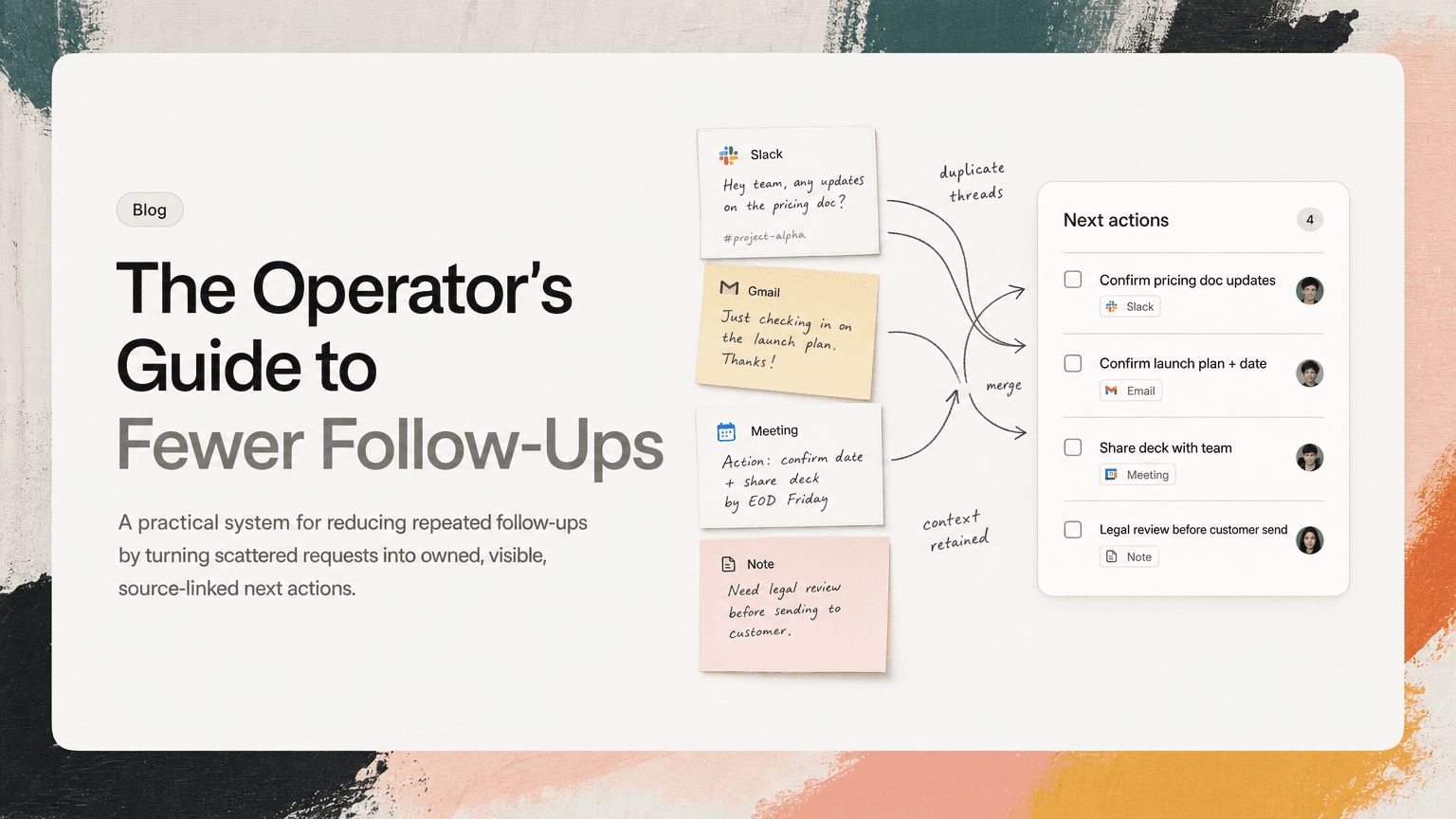
A practical system for reducing repeated follow-ups by turning scattered requests into owned, visible, source-linked next actions.
Operators spend a surprising amount of time asking the same question in different ways:
“Where does this stand?”
The question shows up in Slack threads, email nudges, meeting recaps, project updates, and one-off pings. It is usually framed politely. It is also expensive. Every repeated follow-up means some piece of work was not captured clearly, assigned cleanly, prioritized visibly, or connected to the context that created it.
The goal is not to eliminate follow-ups entirely. Operators will always need to clarify, unblock, and coordinate. The goal is to reduce repeated follow-up work: the second, third, and fourth reminders that happen because the work lives in too many places and no one is sure what actually needs to happen next.
Here is a practical system for doing that.
Start by separating follow-up from chasing
Not all follow-ups are the same.
A useful follow-up moves work forward. It clarifies ownership, resolves a blocker, or confirms a decision.
A repeated chase is different. It usually means the system failed earlier.
Examples of useful follow-up:
- “Can you confirm whether we’re using the revised launch date?”
- “Do you need legal review before sending this to the customer?”
- “Is the dependency on design still blocking the rollout?”
Examples of repeated chasing:
- “Any update here?”
- “Just bumping this.”
- “Checking again on the deck.”
- “Can someone take this?”
When operators treat every follow-up as an individual communication problem, they stay stuck in reminder mode. When they treat repeated chasing as a signal, they can fix the underlying workflow.
The question to ask is:
What was missing when this work first appeared?
Usually it is one of four things: a clear next action, an owner, a deadline or priority, or the original context.
Capture the work at the moment it appears
Repeated follow-up often starts with weak capture.
Work rarely arrives as a neat task. It shows up as a Slack message, a customer email, a comment in a doc, or a decision buried near the end of a meeting.
For example:
- In Slack: “We should probably update the onboarding email before Monday.”
- In Gmail: “Can you send over the revised pricing language?”
- In a meeting: “Let’s make sure the support team knows about the change.”
- In notes: “Ops to coordinate rollout comms.”
Each of these contains work, but none of them is operationally complete. If the operator does not capture it, the team will rely on memory, goodwill, or someone rereading the thread later.
A better capture format is simple:
- Action: What needs to happen?
- Owner: Who is responsible?
- Due or review point: When does it matter?
- Source: Where did this come from?
- Context: What decision, customer, project, or blocker is attached?
So “We should probably update the onboarding email before Monday” becomes:
- Action: Update onboarding email copy to reflect the new setup flow
- Owner: Maya
- Due: Friday EOD for Monday launch
- Source: Slack thread in
#growth-launch - Context: Needed because the setup flow changed in last week’s release
The follow-up burden drops when the first version of the task is specific enough that someone can act without asking three clarifying questions.
Turn vague requests into operational next actions
Operators often inherit ambiguous language. The trick is to translate it quickly.
Here are common phrases that create follow-up loops:
- “Look into this”
- “Circle back”
- “Make sure this happens”
- “Sync with the team”
- “Handle comms”
- “Get alignment”
These are not tasks. They are placeholders for thinking.
Use a translation habit:
From “look into this” to an outcome
Instead of:
“Look into the billing issue.”
Write:
“Identify why Acme was charged twice, confirm whether it affects other accounts, and propose next step by Thursday.”
From “sync with the team” to a decision
Instead of:
“Sync with product on the rollout.”
Write:
“Confirm with product whether the rollout starts with beta customers or all Pro accounts, then update launch checklist.”
From “handle comms” to a deliverable
Instead of:
“Handle customer comms.”
Write:
“Draft customer email explaining the billing fix, get support lead approval, and schedule send after engineering confirms deployment.”
This level of specificity may feel slightly slower at capture time. It is much faster than sending four reminders later.
Deduplicate before you follow up
Repeated follow-up work is often duplicate work in disguise.
The same action item may appear in three places:
- A Slack thread where the issue first came up
- A meeting note where it was discussed again
- An email from a stakeholder asking for the same update
If the operator treats these as separate tasks, they create extra noise. If they ignore two of them, they risk missing context.
Before sending another follow-up, check whether the thing you are chasing already exists somewhere else.
Ask:
- Is this the same action as another task, just worded differently?
- Did this start in Slack and then get repeated in a meeting?
- Is the email asking for a new deliverable or asking about an existing one?
- Are multiple people following up on the same unresolved decision?
A useful operating move is to merge duplicates into one canonical task and attach the relevant sources.
For example:
- Slack: “Do we have the final enterprise terms?”
- Gmail: “Please send over updated procurement language.”
- Meeting note: “Legal/procurement language still open.”
Canonical task:
“Finalize enterprise procurement language, confirm legal approval, and send updated terms to sales by Wednesday.”
Now follow-up becomes easier. Instead of chasing three threads, you manage one item with the right context attached.
This is one reason tools like CTRL can help operators: they can read across Slack, Gmail, meetings, and notes, then turn scattered signals into clearer, deduplicated next actions. The important part is not having another list. It is reducing the number of places an operator has to inspect before knowing what is actually open.
Make ownership visible, not implied
A large amount of follow-up exists because ownership was assumed instead of stated.
In meetings, this often sounds like:
“Let’s get that ready for next week.”
Who is “let’s”?
In Slack, it looks like:
“Can we update the dashboard?”
Who is “we”?
In email, it appears as:
“It would be great to have this before the customer call.”
Who is expected to produce it?
Operators can reduce future chasing by refusing to let important work leave the room without an owner.
Use direct, lightweight language:
- “Who owns the next step?”
- “I’m capturing this as Priya to draft, Jonah to review. Correct?”
- “Is this a decision for product or a task for ops?”
- “Before we move on, what is the next action and who has it?”
This is not bureaucracy. It is the smallest possible intervention that prevents a later reminder loop.
Add a review point when the deadline is unclear
Not every task has a hard due date. But every open loop needs a review point.
If the operator only captures “sometime soon,” the task will drift until someone asks for an update. That update request becomes another follow-up.
Instead of forcing artificial deadlines, use review points:
- “Review by Friday if no customer response”
- “Check after engineering deploys fix”
- “Revisit in Monday planning”
- “Confirm before the executive meeting”
- “Escalate if vendor has not replied by Wednesday noon”
Review points are especially useful for work dependent on others. They give the operator a reason to check in without relying on memory.
Example:
“Waiting on finance to confirm invoice adjustment. Review Wednesday morning; if no response, escalate before customer QBR.”
That is much better than:
“Follow up with finance.”
The first version explains why, when, and what happens next.
Keep the source attached to the task
A follow-up gets slower when the operator has to reconstruct the history.
You have probably experienced this pattern:
- You see a task: “Update launch FAQ.”
- You cannot remember what changed.
- You search Slack.
- You scan meeting notes.
- You open Gmail.
- You ask someone, “What was the context here again?”
Now the follow-up has created more context switching.
A source-linked task avoids that. The task should point back to the Slack thread, email, meeting, or note where the work originated. It should also include the relevant decision or constraint in plain language.
Example:
“Update launch FAQ to include SSO limitation for workspace admins. Source: launch review meeting. Context: Support flagged likely confusion for enterprise customers.”
With that context attached, the operator does not need to restage the conversation every time the task comes back into view.
Use a daily follow-up pass, not constant checking
Operators can easily spend the whole day reacting. Slack pings, Gmail replies, calendar transitions, and task updates all invite immediate attention.
A better pattern is a scheduled follow-up pass.
Try this once in the morning and once late afternoon:
Morning pass
Ask:
- What is due or blocked today?
- What needs a decision before other work can move?
- Which open loops affect customers, leadership, launch dates, or revenue?
- Which follow-ups can be combined into one update?
Afternoon pass
Ask:
- What changed today that affects tomorrow’s priorities?
- Which owners need a specific nudge?
- Which tasks should be closed, merged, or re-scoped?
- What context should be attached before the thread goes cold?
Batching follow-up work reduces context switching. It also improves the quality of the nudge because you are looking at the whole system, not reacting to the latest notification.
A weak nudge says:
“Any update?”
A strong nudge says:
“Can you confirm by 3pm whether legal approved the procurement language? Sales needs the final version before sending the Acme renewal package.”
The second version is easier to answer because it includes the action, deadline, and reason.
Create a simple follow-up ladder
Not every open loop deserves the same level of attention. Operators need a ladder so they do not over-escalate small items or under-escalate important ones.
A practical ladder:
- Clarify: “Is this still needed, and who owns it?”
- Nudge: “Can you send the draft by EOD so review can happen tomorrow?”
- Reframe: “This is blocking the customer response. What is the fastest next step?”
- Escalate: “We need a decision today. If no objection, I’ll proceed with option B.”
- Close: “No response after two review points, closing this unless it becomes active again.”
The close step matters. Operators often carry stale loops for too long. Closing low-value or outdated tasks is part of reducing follow-up work.
What to measure manually
You do not need a dashboard to improve this. For one week, track a few signals:
- How many times did you send “any update?”
- How often was the owner unclear?
- How often did you search for the original context?
- How many duplicate tasks or threads did you merge?
- Which meetings created action items without owners?
The point is not perfect measurement. The point is pattern recognition.
If most repeated follow-ups come from meetings, fix meeting capture. If they come from Slack, fix thread-to-task conversion. If they come from email, create a stronger system for turning follow-up requests into owned work.
The operator’s real job is not reminding people
Operators will always follow up. That is part of the role.
But the highest-leverage version of the work is not being the person who remembers everything. It is building a system where fewer things depend on memory in the first place.
That system has a few clear habits:
- Capture work where it appears
- Translate vague requests into next actions
- Deduplicate repeated asks
- Make ownership explicit
- Add review points when deadlines are soft
- Keep the source and context attached
- Batch follow-up instead of constantly checking
CTRL is useful in this workflow when the work is spread across Slack, Gmail, meetings, calendar events, and notes, because the hard part is often seeing the real action item underneath the scattered communication.
The outcome is simple: fewer repeated nudges, fewer stale loops, and more time spent moving work forward instead of asking where it stands.


Make today life changing
Move from conversation to actions in seconds
Download the ^ctrl desktop app