By Ctrl Editorial Team · June 2, 2026 · 9 min read
Your Task List Gets Old the Moment Work Moves to Chat
Why chat-driven work outpaces static task lists, and how to keep action items current without copying every message by hand.
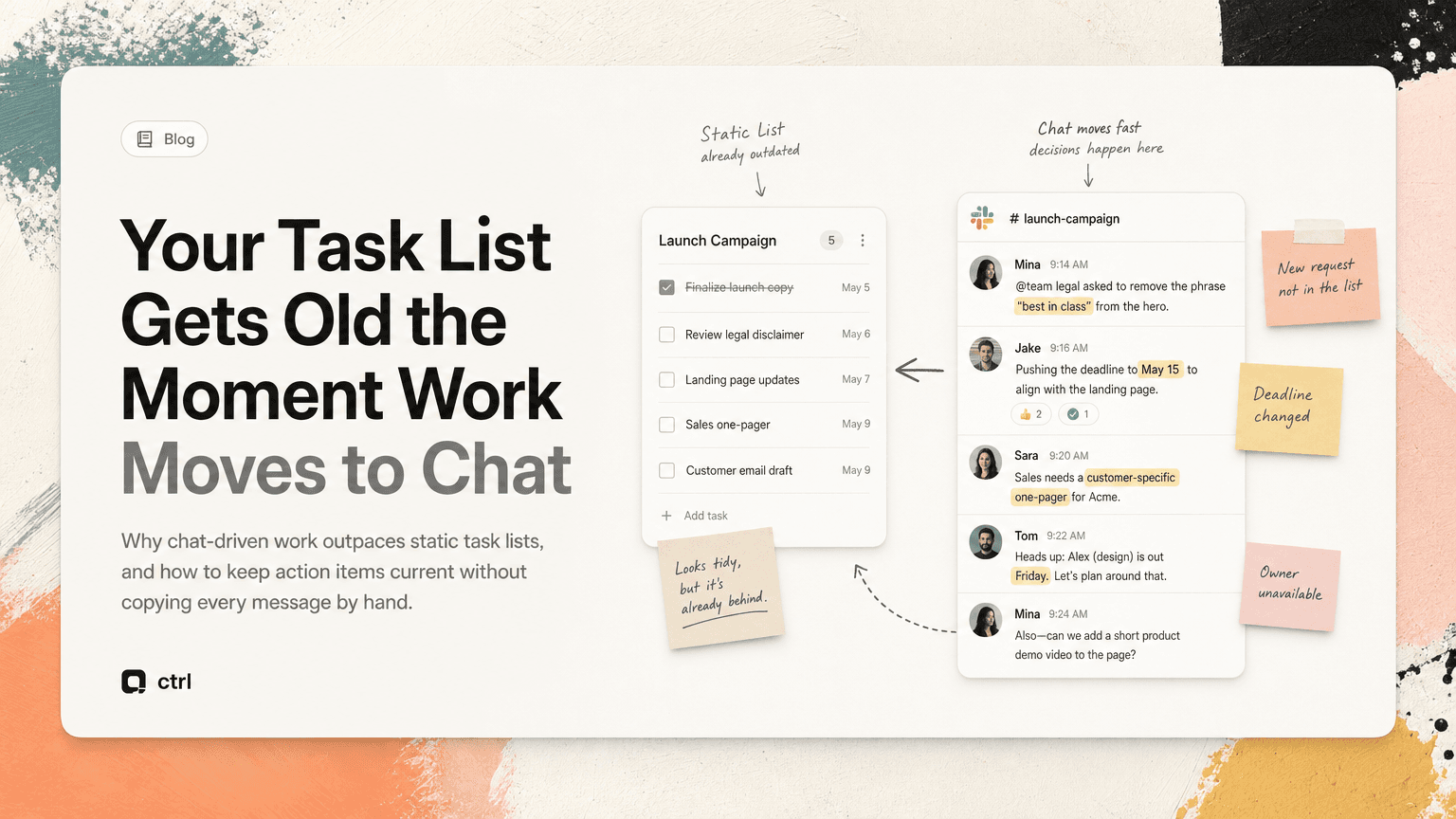
Most task lists are built for work that is already clear.
Chat is where work becomes clear.
That gap is why task lists get stale so quickly. A project plan might say “Finalize launch copy,” but the real work unfolds in a Slack thread: legal wants one phrase removed, the PM changes the deadline, sales asks for a customer-specific version, and someone mentions that the landing page owner is out Friday.
By the time someone opens the task manager, the list is already behind.
This is not because people are careless. It is because modern work does not arrive as clean tasks. It arrives as fragments: messages, replies, meeting comments, email threads, calendar changes, quick decisions, and “can you also…” requests.
If your system only updates when someone manually translates all of that into tasks, it will decay.
The task list is usually downstream of the real work
A task list is often treated as the source of truth. In practice, it is usually a summary of what someone remembered to capture.
The real source material lives elsewhere:
- Slack threads where decisions are made in replies
- Gmail conversations where customers ask for changes
- Meeting notes where owners are implied but not assigned
- Calendar events that change urgency without changing the task
- Shared docs where scope shifts in comments
A task list can be useful, but it is rarely where the work starts.
This creates a delay. Someone has to notice the work, interpret it, create a task, add the right owner, choose a deadline, and include enough context for the task to make sense later. If any step is skipped, the list becomes less reliable.
The problem gets worse when teams move quickly. A Slack message can create, change, or cancel work in seconds. A static list cannot keep up unless it is continuously maintained.
Why chat makes task lists stale
Chat is fast, informal, and conversational. That makes it useful for coordination, but difficult for task tracking.
1. Action items are hidden inside normal conversation
People rarely write chat messages like formal tasks.
They write:
“Can we make sure the onboarding email mentions the new billing flow before we send this?”
Or:
“I think we should hold the enterprise announcement until after the customer call.”
Or:
“Let’s circle back with Maya once the API fix is merged.”
Each of those contains work. But none of them looks like a task unless someone is paying attention.
A task list that depends on manual capture will miss anything that is phrased casually, especially when the thread is long or the channel is busy.
2. Ownership is often implied
Chat relies on shared context. If someone says “Can we update this before Friday?” the owner may be obvious to the people in the thread. It may not be obvious two days later.
This creates vague tasks like:
- “Update onboarding email”
- “Follow up on API issue”
- “Check launch timing”
These tasks are technically captured, but they are weak. They lack the who, why, and what changed.
A stale task list is not always empty. Sometimes it is full of tasks that are too vague to act on quickly.
3. Decisions change after the task is created
The list says:
- “Send pricing proposal to Acme”
Then the Gmail thread changes. The customer asks for a security review first. Sales decides to hold the proposal. Legal needs to approve one clause. A meeting gets scheduled for Thursday.
Unless someone updates the task, it now points to the wrong next step.
This is one of the most common ways task lists go stale: the task was correct when created, but the surrounding conversation moved on.
4. The same work appears in multiple places
A single action item might show up in Slack, then again in a meeting, then again in Gmail.
Example:
- Slack: “Can someone confirm the migration timeline?”
- Meeting notes: “Ops to validate migration schedule.”
- Email: “Following up on expected migration dates.”
If each becomes a separate task, the list looks busier than it is. If none are connected, people waste time figuring out whether they are duplicates.
Stale lists are not only missing work. They also contain repeated work.
5. Context disappears when tasks are copied manually
A copied task often loses the thread that made it important.
“Follow up with Jordan” is much less useful than:
“Follow up with Jordan about whether the analytics event rename affects the launch dashboard, based on the Slack thread from Tuesday.”
The second version carries context. The first creates more searching.
When tasks are separated from the conversation that created them, the person doing the work has to reconstruct the reason behind the task. That usually means switching back into Slack, Gmail, notes, or the calendar.
A practical way to keep chat-driven work current
The goal is not to turn every message into a task. That would create noise.
The goal is to create a system that catches real commitments, keeps context attached, and makes it easy to decide what matters now.
Here is a practical workflow.
Step 1: Define what counts as a task
If everything is a task, nothing is.
Use a simple rule: a message becomes a task only when it implies a concrete next action.
Good candidates:
- Someone needs to send, review, decide, update, schedule, approve, investigate, or follow up
- There is an implied owner or a clear team responsible
- The outcome matters to a project, customer, deadline, or decision
- The item will be forgotten if it stays only in chat
Not every idea belongs on the list. “We should consider a new onboarding flow someday” may be useful, but it is not automatically a task. “Can you draft two onboarding flow options before Thursday’s review?” is.
This distinction keeps the list from becoming a landfill.
Step 2: Capture the next action, not the entire conversation
A useful task should be short, specific, and action-oriented.
Instead of:
- “Launch thread”
Write:
- “Confirm whether the launch email should wait until the API fix is merged.”
Instead of:
- “Customer follow-up”
Write:
- “Reply to Acme with the updated migration timeline after ops confirms dates.”
The task should answer three questions:
- What needs to happen next?
- Who is responsible?
- What context explains why this matters?
If a task cannot answer those questions, it will likely create another round of clarification later.
Step 3: Keep the source attached
The fastest way to prevent stale tasks is to keep the original source close.
If a task came from a Slack thread, link the thread. If it came from Gmail, keep the email connected. If it came from a meeting, attach the note or decision that created it.
This matters because work changes. When someone returns to the task later, they should not have to search across five tools to understand what happened.
A source-linked task lets someone check:
- What was actually requested
- Who asked for it
- What decision led to it
- Whether the conversation changed after capture
- Which related details are still unresolved
Without the source, the task becomes a brittle summary.
Step 4: Review for changes, not just completion
Most task reviews ask: “What did I finish?”
For chat-driven work, also ask: “What changed?”
A useful daily review might include:
- Which tasks were created from Slack or Gmail yesterday?
- Which open tasks had new comments, replies, or meeting updates?
- Which tasks are now blocked by a decision?
- Which tasks are duplicates of the same underlying request?
- Which tasks no longer matter?
This review does not need to take long. The point is to compare your list against the places where work moved since the list was last updated.
That is the missing maintenance step in most systems.
Step 5: Deduplicate before prioritizing
Prioritization gets messy when the list contains duplicates.
Before deciding what matters today, group repeated action items.
For example, these may all be one piece of work:
- “Ask eng about dashboard delay”
- “Follow up on analytics dashboard timing”
- “Confirm if launch dashboard will be ready”
Once grouped, the real task might be:
- “Get engineering’s final answer on launch dashboard readiness and share the decision in the launch channel.”
Now the task is clearer, and the list is shorter.
This is especially important for operators, founders, product managers, and customer-facing teams, where the same request often bounces across meetings, Slack, and email.
Step 6: Prioritize based on current context
A stale list often prioritizes old assumptions.
A task that seemed urgent yesterday may be irrelevant after a customer delays a call. A minor follow-up may become urgent after a founder asks for an answer before an investor meeting. A blocker may disappear because someone resolved it in a thread overnight.
When reviewing your day, look at tasks through current context:
- Is there a meeting today that changes urgency?
- Did a customer reply in Gmail?
- Did a Slack thread resolve or reopen the issue?
- Is someone waiting on your answer before they can move?
- Is the task still the next action, or has the next action changed?
A good task list should not just show what you planned. It should show what is now true.
Where AI can help without taking over
The hard part is not knowing that tasks should be updated. The hard part is doing it consistently while work is happening across several tools.
This is where an assistant can help. CTRL connects to places like Slack, Gmail, Google Calendar, meetings, and shared notes, then helps turn scattered communication into clear next actions. The useful part is not replacing judgment. It is reducing the manual work of finding, deduplicating, and contextualizing tasks.
You still decide what matters. The assistant helps surface what changed, where the task came from, and whether the same action item appeared in more than one place.
That is different from a generic todo app. A todo app waits for clean input. Chat-driven work rarely gives you clean input.
A simple operating rhythm
If your task list keeps getting stale, try this rhythm for one week:
Morning: build from current signals
Before opening your task list, scan the places where work moved:
- Slack mentions and important threads
- Gmail replies that require action
- Calendar events for the day
- Meeting notes from yesterday
- Existing open tasks
Then choose the real priorities for today.
Midday: check for changed assumptions
Look for tasks affected by new messages or decisions.
Ask:
- Did anything become blocked?
- Did anything become unnecessary?
- Did a new owner emerge?
- Did a deadline move?
Update only what changed.
End of day: close loops
Before signing off, identify loose ends:
- Follow-ups promised in chat
- Decisions made but not reflected in tasks
- Meeting action items without owners
- Email threads waiting on you
- Duplicate tasks that should be merged
This keeps tomorrow from starting with a stale list.
The real problem is not the list
Task lists get stale when they are disconnected from the conversations that create and change work.
Chat is not the enemy. Slack, Gmail, and meetings are where useful context lives. The problem is expecting a static list to stay accurate while the work keeps moving elsewhere.
The fix is to treat task management as a translation layer: from scattered conversation into clear next actions, with source context attached and regular checks for what changed.
Do that, and your task list becomes less of a memory test.
It becomes a current map of the work that actually needs to happen.


Make today life changing
Move from conversation to actions in seconds
Download the ^ctrl desktop app