By Ctrl Editorial Team · June 7, 2026 · 9 min read
Your Todo List Is Missing the Work Between the Lines
Most todo lists only capture obvious tasks. Learn how to find the hidden work buried in Slack, Gmail, meetings, and decisions.
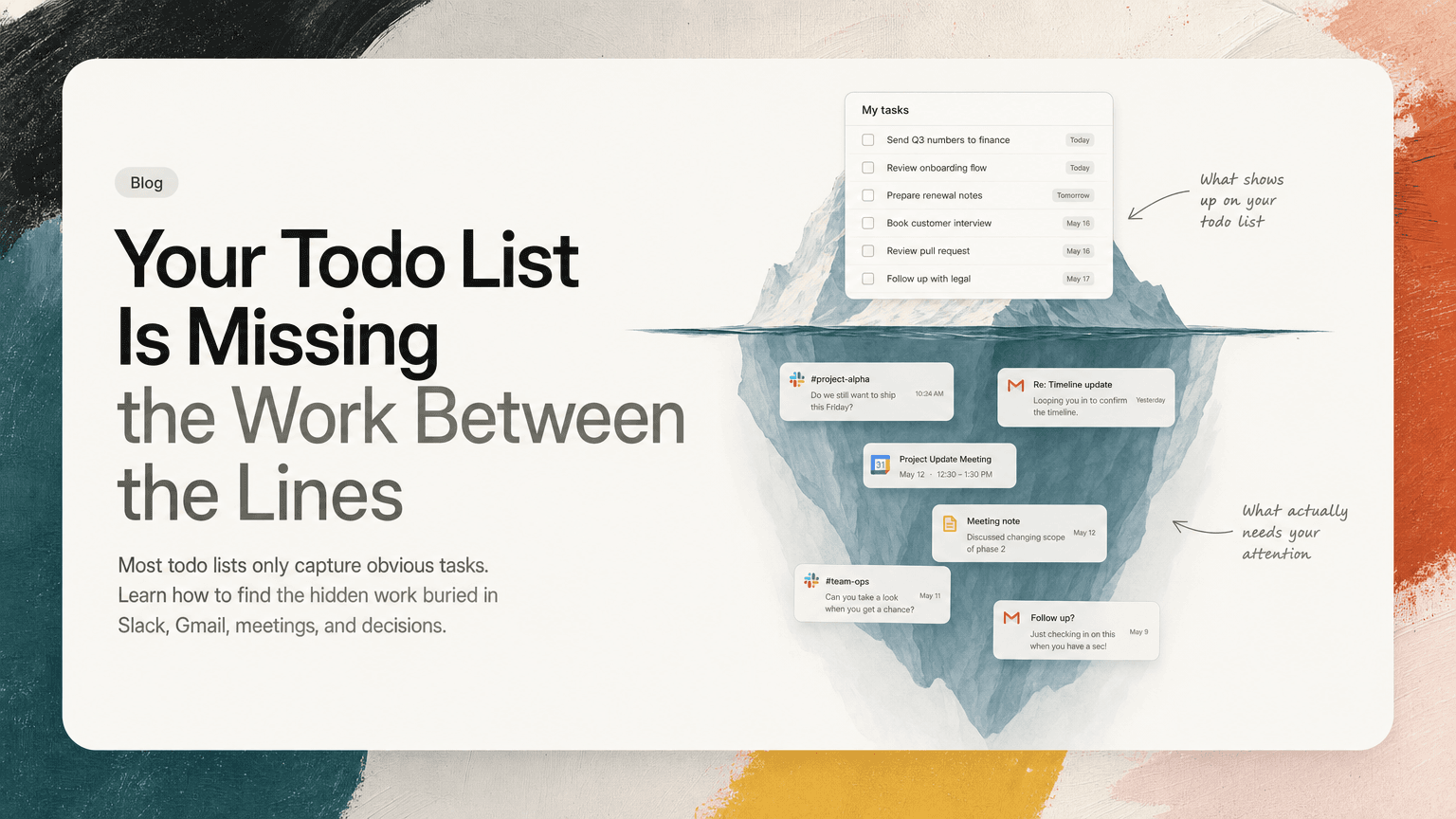
Most todo lists are honest but incomplete.
They show the work you remembered to write down: send the proposal, review the spec, book the meeting, follow up with legal. That makes them feel reliable. But a lot of modern work does not arrive as a neat task. It arrives as a Slack reply, a sentence in a meeting, a buried Gmail thread, a decision made in passing, or a “can you take a look?” that sounds casual until someone is waiting on it.
The result is a strange daily mismatch: your todo list says you have six things to do, but your brain knows there are twenty loose ends somewhere.
The problem is not that you are bad at task management. The problem is that your todo list only captures one type of work: the work that has already been translated into a task.
The hidden work layer
A todo list is usually built from explicit commitments:
- “Draft onboarding plan”
- “Send Q3 numbers to finance”
- “Review pull request”
- “Prepare customer renewal notes”
But your real work includes many things that are less explicit:
- A Slack thread where someone asks, “Do we still want to ship this Friday?”
- A Gmail reply that says, “Looping you in to confirm the timeline.”
- A meeting where the team decides to change the rollout plan.
- A doc comment that implies you need to update a section.
- A repeated request from two different people about the same customer issue.
None of these automatically becomes a clean task unless someone catches it, phrases it, prioritizes it, and puts it somewhere you will see later.
That translation step is where work disappears.
Why manual capture breaks down
Manual task capture works in calm conditions. It breaks when work is fragmented.
Imagine a normal morning:
You open Slack to check one message and find three threads with your name in them. One is a decision, one is a question, and one is a vague request. Then you jump into a customer call. During the call, someone says you should send a follow-up by Friday. After that, Gmail has a vendor thread where the next step is technically yours, but no one says “task.” Then you open your todo app and try to remember what mattered.
You might capture the obvious items. You will likely miss the implied ones.
This happens because manual capture depends on several things going right at the same time:
- You notice the commitment.
- You recognize it as a task.
- You stop what you are doing.
- You open the right tool.
- You write the task clearly.
- You attach enough context to understand it later.
- You remember to prioritize it.
That is a lot of friction for a single follow-up.
When you are moving quickly, the brain optimizes for continuing the conversation, not maintaining a perfect work ledger.
The four types of work your todo list misses
Most missing work falls into a few repeatable patterns. Once you know them, you can start catching them earlier.
1. Implied asks
An implied ask is a request that never uses task language.
Examples:
- “Can you sanity check this before we send?”
- “Do we have a point of view on pricing here?”
- “Worth updating the roadmap slide?”
- “I think customers will ask about migration.”
These are easy to dismiss because they sound conversational. But many of them contain real work: review this, decide this, update this, prepare for this.
A practical habit: when you see a vague ask, rewrite it as a verb-led action.
- “Review launch email before it goes out.”
- “Decide pricing position for enterprise plan.”
- “Update roadmap slide with migration note.”
If you cannot write it as a verb, it probably needs clarification.
2. Meeting decisions without owners
Meetings often produce decisions, but decisions are not the same as next actions.
A team might decide:
- “We will delay the launch until next Tuesday.”
- “Support should get a migration FAQ.”
- “We are going to remove that feature from the beta.”
Each decision creates downstream work. Someone needs to update the launch calendar. Someone needs to write the FAQ. Someone needs to change the beta scope. If those next actions are not named before the meeting ends, the decision becomes shared memory instead of execution.
A practical habit: at the end of every meeting, ask three questions:
- What changed?
- Who owns the next step?
- Where will that next step live?
Do not settle for “we should.” Convert it into “Alex will send the updated launch note by Thursday.”
3. Email threads where ownership shifts
Email hides tasks because ownership changes gradually.
A thread starts with someone else. Then you are copied. Then someone asks for confirmation. Then the thread pauses because everyone assumes you are reviewing it.
The task may never be stated directly, but the waiting is real.
Watch for phrases like:
- “Adding you here for visibility.”
- “Can you confirm?”
- “Before we proceed…”
- “Once we hear back from you…”
- “Let us know if this works.”
These usually mean the ball has moved.
A practical habit: when you scan Gmail, look less for unread messages and more for ownership transfer. Ask: “Is anyone waiting on me before this can move?”
If yes, capture the response as a task, not just an email to remember.
4. Duplicate requests in different places
Sometimes your todo list misses work because the same issue appears in multiple tools and never gets consolidated.
A customer concern appears in Slack. Then it comes up in a sales call. Then someone mentions it in a product doc. Each instance looks separate, but they point to one underlying action.
Without deduplication, you get two bad outcomes:
- You ignore the pattern because each mention feels small.
- You create multiple tasks for the same thing and waste time reconciling them later.
A practical habit: when you see a familiar ask, search your current tasks before creating a new one. If it already exists, add the new context to the existing task instead of making another copy.
This keeps the work clearer and helps you see when something is becoming important.
A better capture system: inboxes, verbs, context, review
You do not need a more elaborate todo list. You need a better path from scattered communication to trusted next actions.
Here is a simple system.
Step 1: Define your real work inboxes
Most people have more than one inbox. Yours might include:
- Slack mentions and threads
- Gmail inbox and starred messages
- Calendar meetings
- Meeting notes
- Shared docs
- Your existing task manager
Write these down. If work can enter through a place, it is an inbox whether you call it one or not.
The goal is not to check everything all day. The goal is to stop pretending your todo app is the only front door.
Step 2: Convert signals into next actions
When you process an inbox, do not copy messages verbatim. Translate them.
Weak task:
- “Pricing thread”
Useful task:
- “Reply in pricing thread with recommendation on annual discount.”
Weak task:
- “Customer call follow-up”
Useful task:
- “Send customer migration timeline and confirm owner for technical review.”
A good task should answer:
- What action will I take?
- Where will I take it?
- What outcome am I trying to create?
This is what makes a list executable instead of decorative.
Step 3: Keep the source attached
A task without context often becomes another interruption. You see “follow up with Sam” and then have to search Slack, Gmail, notes, and calendar to remember why.
Whenever possible, keep a link or reference to the source:
- Slack thread
- Gmail conversation
- Meeting note
- Calendar event
- Shared doc
This matters because the task is rarely the whole story. The source tells you the decision, the constraint, the people involved, and the tone of the conversation.
If you cannot attach the source directly, add one sentence of context:
- “From Monday launch meeting: support needs FAQ before beta invite goes out.”
Step 4: Review for priority, not just completeness
A captured task is not automatically important.
Once you have a more complete list, you need a review pass that asks:
- What is blocking someone else?
- What has a deadline?
- What affects a customer or launch?
- What is duplicated across channels?
- What can be ignored, delegated, or clarified?
This is where many todo systems get noisy. Capturing more work is useful only if you also rank it.
A good daily review should produce a short “today” list, not a giant inventory of everything you have ever agreed to do.
Where AI can help without taking over
The useful role for AI here is not to invent priorities or manage your life for you. It is to reduce the manual translation work.
An assistant can scan the places where work already happens, identify possible action items, group duplicates, and preserve the source context so you are not rebuilding the story from memory. You still decide what matters. The system just makes the hidden layer visible.
That is the idea behind CTRL: it connects to tools like Slack, Gmail, Calendar, meetings, and shared notes, then turns scattered communication into clearer next actions. It is not about replacing judgment. It is about making sure your judgment is applied to the full picture, not just the tasks you happened to remember.
A simple exercise for tomorrow
Try this for one workday.
Before you start executing, make a list of your work inboxes. Then spend 20 minutes reviewing only for hidden work:
- Open Slack mentions and active threads. Capture implied asks.
- Scan Gmail for ownership transfers. Capture replies people need from you.
- Review yesterday’s meetings. Capture decisions that created follow-up work.
- Check your current task list for duplicates or stale items.
- Pick the three tasks that most affect other people’s progress.
Do not aim for perfection. Aim to notice what your normal todo list misses.
You will probably find that the missing work was not random. It was sitting in predictable places, waiting to be translated.
The real job of a todo list
A todo list should not be a memory test. It should be a working map of commitments.
If half your work starts in Slack, Gmail, meetings, and shared notes, then a list built only from manual entries will always be partial. The fix is not to try harder to remember. The fix is to build a capture habit, or use a tool like CTRL, that follows the actual shape of your work.
The work between the lines is still work. The sooner you catch it, the less it turns into follow-up, confusion, and last-minute cleanup.


Make today life changing
Move from conversation to actions in seconds
Download the ^ctrl desktop app